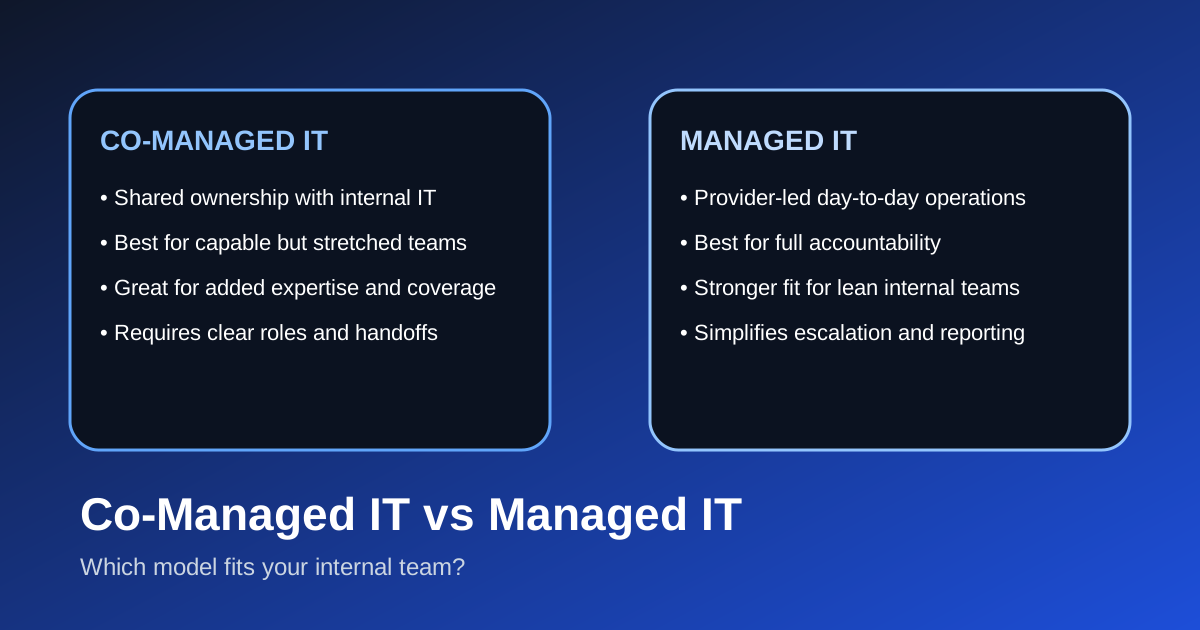

What is the difference between co-managed IT and managed IT?
Co-managed IT is a shared operating model, while managed IT is a full-service operating model. In a co-managed arrangement, your internal IT team keeps meaningful ownership of systems, priorities, and day-to-day decisions while an external partner fills specific gaps such as help desk overflow, security operations, project delivery, tooling, or after-hours coverage.12 In a managed IT model, the provider becomes the primary accountable partner for support, maintenance, monitoring, security coordination, and roadmap execution across the environment.23
That sounds simple, but the decision matters because the wrong model creates friction fast. If your internal team still wants control and has solid institutional knowledge, full outsourcing can feel heavy-handed. If your team is overloaded and leadership wants one throat to choke, co-managed IT can leave too much ambiguity.
At Datapath, we think the best choice comes down to operating reality: who owns the work, who responds after hours, who documents decisions, and who leadership expects to be accountable when something breaks.
When does co-managed IT make more sense than fully managed IT?
Co-managed IT usually makes more sense when the company already has an internal IT team that knows the business well but needs more capacity, more specialization, or more coverage than it can deliver alone.
In practice, that often looks like this:
- the internal team is strong on user support but needs help with security tooling
- infrastructure knowledge sits with one or two overextended people
- leadership wants to keep strategy in-house but outsource repetitive work
- major projects are stacking up faster than the team can execute them
- after-hours monitoring, escalation, or vacation coverage is inconsistent
That is why co-managed IT often works well for mid-market businesses with 100 to 500 employees. The organization is too complex for a tiny internal team to do everything, but not every company is ready to hand off the entire operation either. A co-managed model lets the business keep internal context while adding specialized support around areas like managed cybersecurity services, compliance readiness, Microsoft 365 administration, or project delivery.
In our experience, co-managed IT also works best when the internal team is collaborative and documentation is reasonably healthy. If ticket ownership, escalation rules, and change approval are fuzzy before the MSP arrives, the partnership can turn into a blame-sharing exercise instead of a force multiplier.
When is fully managed IT the better fit?
Fully managed IT is usually the better fit when leadership wants a single accountable partner to own the environment more end to end.
That tends to be true when:
- the business has no internal IT department or only one generalist
- growth has outpaced internal support maturity
- vendors are unmanaged and nobody owns coordination
- the company needs predictable service levels and reporting
- executives want clearer accountability for uptime, security, and support
For those organizations, a full-service relationship is often cleaner than trying to split responsibilities. Instead of debating which team owns each alert, upgrade, onboarding process, or vendor ticket, the provider takes the lead and builds an operating rhythm around the business.
That is also why many companies looking at managed IT services or comparing IT outsourcing services eventually realize the bigger issue is not tool selection. It is operating accountability. If your internal team is stretched too thin to manage roadmap planning, lifecycle management, patching, endpoint security, help desk workflows, and vendor escalations consistently, a managed IT model can be more realistic than a partial one.
How should buyers compare co-managed IT and managed IT in practice?
The cleanest comparison is not price first. It is responsibility first.
| Decision area | Co-managed IT | Managed IT |
|---|---|---|
| Day-to-day ownership | Shared between internal IT and provider | Primarily provider-led |
| Internal staffing need | Moderate to high | Low to moderate |
| Best use case | Strong internal team with support gaps | Business wanting end-to-end accountability |
| Flexibility | High, if scope is defined clearly | High, but more provider-dependent |
| Risk if poorly defined | Duplicate work or missed handoffs | Overreliance on provider or poor fit |
| Leadership reporting | Joint or blended | Usually centralized through provider |
Who owns tickets, projects, and escalations?
This is the first question we would ask. In a co-managed model, some workstreams stay internal and others move to the partner. That can work extremely well, but only if ownership is written down. If an employee laptop issue turns into an identity problem which turns into a cloud configuration problem, everyone needs to know where the handoff happens.
In a managed IT model, that ownership picture is usually simpler. The provider owns the intake path, triage, vendor coordination, and escalation flow, then reports back to leadership and business stakeholders.
Who owns security and compliance operations?
Security ownership is where many otherwise good partnerships break down. A company may think the partner is handling security, while the partner believes it is only handling tooling or alerting. CISA and NIST both stress that governance, access management, response planning, and ongoing control validation matter just as much as technology deployment.45
For regulated organizations, that distinction matters even more. If your business is dealing with HIPAA, GLBA, SOC 2, PCI DSS, CJIS, or school-related compliance requirements, you need very clear language around who reviews logs, who manages exceptions, who documents evidence, and who leads remediation. That is one reason we often connect this conversation to our posts on SOC 2 readiness, FTC Safeguards Rule risk assessment templates, and cybersecurity risk assessments.
Who owns the roadmap?
A co-managed relationship can work if the internal team still owns architecture and long-range planning. A managed IT relationship is often stronger when the provider is expected to lead lifecycle planning, budgeting guidance, and operational improvement.
If nobody owns the roadmap, both models underperform.
What are the biggest advantages of co-managed IT?
Co-managed IT is attractive because it lets businesses keep internal knowledge while adding scale.
It preserves institutional knowledge
Internal teams usually know the business workflows, decision-makers, edge cases, and political realities better than any outside provider on day one. A co-managed model protects that advantage instead of replacing it.
It fills skill and bandwidth gaps faster
Hiring experienced infrastructure, cloud, or security talent is slow and expensive. A co-managed partner can add specialized capability much faster, especially for project surges, policy work, vendor management, or after-hours support.12
It gives internal IT breathing room
A lot of internal teams spend too much time on reactive work. If the partner absorbs patching, monitoring, routine tickets, or recurring admin tasks, internal staff can spend more time on higher-value priorities like process improvement, system adoption, or business alignment.
What are the biggest advantages of fully managed IT?
Managed IT is attractive because it simplifies accountability.
It gives leadership one operational partner
That matters when the business wants regular reporting, standardized support, vendor coordination, and a clearer service model. If performance is slipping, leadership knows where to start the conversation.
It reduces dependency on a few internal people
A lot of businesses are more fragile than they realize because one employee knows the firewall, another knows Microsoft 365, and no one has documented how key systems actually work. Managed IT can reduce that single-point-of-failure risk when the provider builds shared process, documentation, and operational coverage.
It usually creates a cleaner service desk experience
When the provider is the primary front door for support, users have fewer questions about where to go. That cleaner intake path often improves responsiveness, reporting consistency, and trend analysis.
What mistakes do companies make when choosing between these models?
The biggest mistake is choosing based on labels instead of service boundaries.
We see a few versions of this repeatedly:
- buying co-managed IT when the internal team is already underwater and needs full ownership relief
- buying managed IT when leadership is not willing to standardize tools or processes
- assuming the provider owns security without confirming the exact scope
- keeping too many exceptions and side channels outside the agreed support model
- failing to define success metrics before the engagement starts
Another common issue is underestimating onboarding. Whether the relationship is co-managed or fully managed, the provider still needs documentation, access, approvals, user context, vendor records, and business priorities. If that transition is sloppy, the first ninety days can feel rough even if the long-term fit is good. The practical lesson is simple: treat onboarding like an operational project with owners, milestones, and documented handoffs. Clarity beats assumptions.
Why Datapath for co-managed or managed IT planning?
We work best with organizations that want more than generic outsourcing language. They want a support model that matches their internal reality.
If your team is strong but overloaded, we can help define where co-managed support should start and what responsibilities stay in-house. If leadership wants a partner to own support, monitoring, security coordination, and roadmap execution more completely, we can help structure that model too.
The important thing is not choosing the more fashionable label. It is choosing the model your team can actually operate well. If you are comparing options now, review our homepage, explore our resource library, read our guide to what managed IT services actually include, or talk with our team about which operating model fits your environment.
Frequently Asked Questions
Is co-managed IT cheaper than managed IT?
Sometimes, but not always. Co-managed IT can cost less when the internal team still handles a meaningful share of operations. It can also cost more than expected if responsibilities are split poorly and both teams are effectively doing overlapping work.
Can a company switch from co-managed IT to managed IT later?
Yes. Many businesses start with co-managed support, then shift to a fuller managed IT model as the company grows, staff changes, or leadership decides it wants a single operational owner.
Does co-managed IT still make sense for small teams?
It can, but only if the internal team has enough maturity and availability to own its side of the relationship. If one overextended person is already doing everything, fully managed IT is often the better fit.
Which model is better for compliance-heavy businesses?
Either can work, but compliance-heavy organizations need especially clear ownership. The right choice depends on who will actually manage evidence, remediation, access reviews, policy updates, and incident-response coordination.
What should companies ask before signing with any IT partner?
Ask who owns the help desk, after-hours escalation, security monitoring, onboarding and offboarding, vendor coordination, documentation, reporting, project delivery, and strategic roadmap. If those answers are vague, the contract is not ready.
Sources
- CompTIA: MSP and managed services resources
- IBM: Managed IT services overview
- Microsoft: IT service management guidance
- CISA Cybersecurity Performance Goals
- NIST Cybersecurity Framework 2.0
