
How do you choose between co-managed and fully managed IT models?
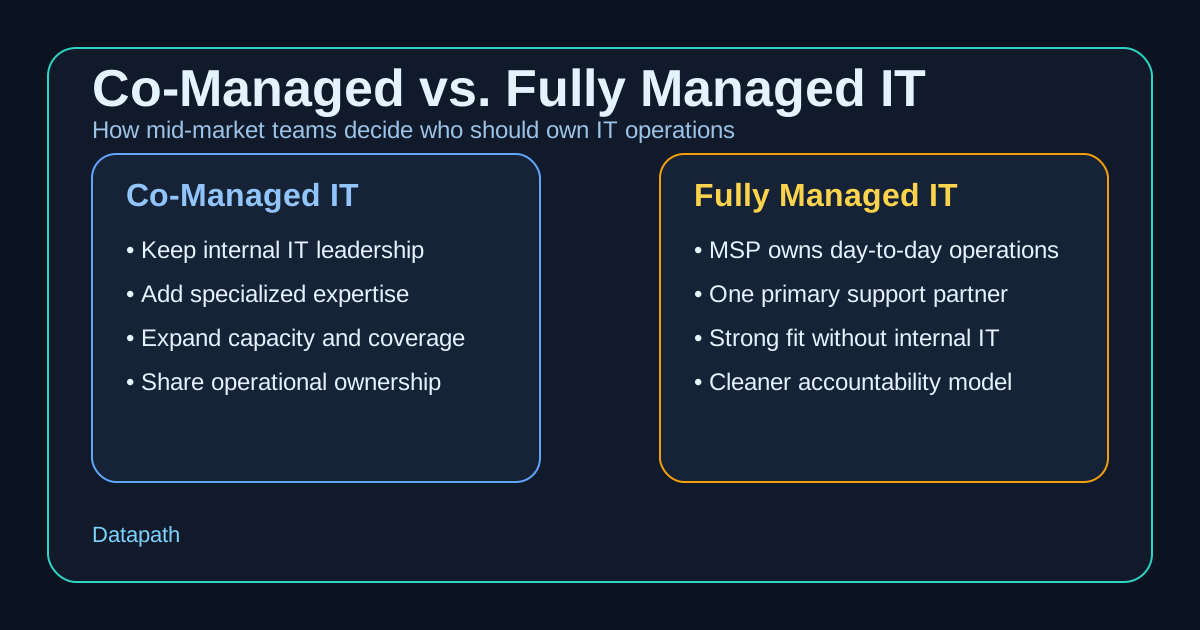
You choose between co-managed and fully managed IT models by looking at who should own day-to-day IT operations, where your internal team is overloaded, how much control you need to keep in-house, and whether the business needs extra capacity or a full operating partner. In most mid-market environments, co-managed IT fits teams that already have internal leadership but need reinforcement, while fully managed IT fits organizations that want one provider to take broader responsibility for support, maintenance, and accountability.123
That distinction matters because the wrong model usually creates friction in both directions. If leadership chooses fully managed IT when an internal team still needs to keep strategic control, the relationship can feel rigid and political. If leadership chooses co-managed IT when nobody internally has the time or authority to manage the provider well, the business often ends up with shared responsibility and unclear ownership instead of relief.
In our experience, the right answer is less about what sounds modern and more about what will keep the business stable, governable, and easier to grow. That is why we recommend reading this topic alongside our managed IT services overview, the Datapath homepage, and buying guidance like What Is Managed IT Services?. The best model is the one that makes support calmer, security more accountable, and leadership less dependent on heroics.
What is the real difference between co-managed and fully managed IT?
The simplest difference is operational ownership. A co-managed model extends an internal IT function. A fully managed model replaces most or all of the day-to-day operating burden with an outside managed service provider.123
Co-managed IT keeps internal leadership in place
With co-managed IT, your internal IT lead or team stays involved. The outside provider helps with capacity, specialized projects, after-hours coverage, help desk overflow, cybersecurity administration, patching, monitoring, or platform expertise your team does not want to build internally.12
That makes co-managed IT a strong fit when your internal team already knows the business well but is stuck spending too much time on repetitive support work, ticket backlogs, backup follow-up, vendor escalations, or security tasks that require more depth than one or two people can reasonably provide. It acts as a force multiplier rather than a replacement.
Fully managed IT shifts the operating burden to the provider
With fully managed IT, the provider becomes the primary owner for support, infrastructure operations, routine maintenance, monitoring, and the wider service desk experience.13 This model is usually attractive when the business has no real internal IT department, when leadership wants one accountable partner, or when the current support model has become too fragmented to manage cleanly.
For many organizations, that means one provider owns user support, endpoint management, Microsoft 365 administration, patching, backup oversight, vendor coordination, and recurring planning instead of leaving those responsibilities scattered across office managers, application owners, or overstretched generalists.
The decision is really about accountability
We think buyers often frame this as a staffing question when it is really an accountability question. Who owns recurring issues? Who reviews patch exceptions? Who handles after-hours escalations? Who coordinates with Microsoft, your ISP, your firewall vendor, or your line-of-business application providers? Who explains risk to leadership in plain language?
| Question | Co-managed IT | Fully managed IT |
|---|---|---|
| Who owns day-to-day IT? | Shared between internal IT and MSP | Primarily the MSP |
| Best fit | Existing internal IT team needs help | Business wants broader outsourcing |
| Control level | Higher internal control | More provider-led execution |
| Typical use cases | Skill gaps, capacity limits, 24/7 coverage, special projects | No internal IT, leadership wants one accountable partner |
| Main risk if chosen poorly | Responsibility stays muddy | Internal team feels sidelined or overdependent |
That is why buyers comparing support models should also review practical evaluation questions like Vendor Risk Questionnaire: What to Ask a Managed IT Provider Before Signing and How to Compare Co-Managed IT Pricing for Mid-Market Teams. The service model is only as good as the operating clarity behind it.
When does co-managed IT make more sense?
Co-managed IT usually makes sense when the business already has internal IT leadership worth preserving, but the workload has grown beyond what that team can handle comfortably.234
Your internal team knows the business but lacks capacity
Many mid-market companies have one strong IT manager or a small internal team that understands the business, knows the line-of-business systems, and has credibility with leadership. The problem is not usually incompetence. It is load. Password resets, endpoint issues, Microsoft 365 administration, user onboarding, after-hours alerts, wireless troubleshooting, project work, and compliance follow-up all start competing for the same finite hours.
A co-managed model lets the organization keep that internal business knowledge while adding help where the pressure is highest. That can be especially useful if your internal lead should be focused on roadmap work, vendor strategy, security improvements, or modernization planning instead of spending the week clearing low-level queue items.
You need specialized expertise without adding headcount
Co-managed IT also fits businesses that need stronger support in areas like cloud migrations, identity hardening, vulnerability management, backup governance, or compliance readiness, but do not want to hire several specialists full time.34 That tradeoff matters in regulated or accountability-heavy environments where the internal team needs support from people who have seen these issues across multiple organizations.
In those environments, we often suggest pairing this comparison with related guidance on managed cybersecurity services, cybersecurity risk assessments, and resources and guides. Co-managed support is often strongest when it helps the internal team close specific operational and security gaps.
You want flexibility without giving up control
Some organizations have clear reasons to keep parts of IT internal. That may include proprietary application knowledge, plant-floor workflows, acquisition integration, political realities, or a leadership preference to retain architectural control. Co-managed IT can work well in those cases because it adds leverage without demanding that the business hand over every operational decision.
That flexibility is valuable, but it only works when responsibilities are documented clearly. If both sides assume the other is reviewing backups, handling escalations, or watching key alerts, the arrangement can create ambiguity instead of relief.
When is fully managed IT the better choice?
Fully managed IT is usually the better choice when the business wants one partner to own daily IT execution more completely and there is no strong reason to preserve a hands-on internal operating role.123
You do not have a true internal IT department
A lot of companies say they have internal IT when they really have an operations manager, office administrator, or technically capable employee carrying extra responsibilities. That setup can work for a while, but it rarely scales cleanly once the business depends on cloud applications, remote access, cybersecurity controls, vendor coordination, and recurring planning.
In those cases, fully managed IT often creates more stability because the provider owns the recurring operational rhythm. Instead of expecting a non-specialist to coordinate patches, tickets, backup alerts, Microsoft licensing, user lifecycle management, and vendor escalations, the business gets a clearer support structure from the start.
Leadership wants one accountable operating partner
Fully managed IT also makes sense when leadership is tired of fragmented ownership. If issues bounce between internal staff, outside consultants, software vendors, and individual department champions, service quality usually degrades. A fully managed relationship can simplify that by making one provider responsible for triage, coordination, escalation, and reporting.
That clarity is often useful for organizations comparing broader managed IT services, evaluating a vCIO roadmap template for mid-market IT planning, or deciding whether outsourced help desk cost is worth the tradeoff. The point is not just outsourcing tasks. It is reducing confusion.
Your business needs coverage that one internal person cannot realistically provide
Mid-market businesses often need support across more hours, systems, and locations than one or two internal people can cover. That includes after-hours incidents, endpoint response, identity administration, hardware lifecycle issues, backup coordination, and recurring vendor management. If those demands are already exceeding what your current team can handle, fully managed IT may be the more honest model.
We think this is especially true when the business has multiple sites, recurring compliance pressure, rapid hiring, or a history of downtime caused by unresolved basics rather than one dramatic technology failure. If nobody has enough time to run the fundamentals consistently, full ownership from a provider can be healthier than pretending the internal model is still working.
What should a mid-market business evaluate before deciding?
The best decision usually comes from asking a handful of practical questions, not from chasing the trendiest service description.
1. Who should own the relationship with the business?
If your internal IT leader has strong business trust and should remain the main translator between technology and leadership, co-managed IT may preserve that advantage. If no one internally is positioned to do that work consistently, fully managed IT may be the cleaner option.
2. Where is the real bottleneck today?
If the bottleneck is skill depth or ticket capacity, co-managed IT may solve the problem. If the bottleneck is that there is no dependable operating structure at all, fully managed IT is often the stronger choice.
3. How much internal control actually matters?
Some businesses say they want control when what they really want is visibility. Those are not the same. Control means making or approving more operational decisions internally. Visibility means getting better reporting, cleaner communication, and confidence that the work is being done. Many organizations are happier with full outsourcing once they realize visibility matters more than direct touch.
4. Can the provider describe responsibilities in writing?
This is one of the most important tests. Before choosing either model, ask the provider to explain exactly who owns help desk, patching, backup review, Microsoft 365 administration, security escalations, vendor management, project work, strategic planning, and after-hours incidents. If that answer stays vague, the model is not ready.
Why Datapath for co-managed or fully managed IT support?
We think the best support model is the one that gives leadership fewer surprises, better operational visibility, and stronger accountability across the basics that keep the business running. Sometimes that means reinforcing a capable internal team with co-managed support. Sometimes it means stepping in as the primary operational partner with a fully managed model.
Our view is that buyers should not be pushed toward a model just because it is easier to sell. They should choose the structure that matches internal bandwidth, business complexity, compliance pressure, and the level of ownership leadership actually wants to keep. If your team is trying to sort that out, start with the Datapath homepage, review our managed IT services overview, explore the resources library, or talk with our team about where the load and accountability gaps really sit today.
Need help deciding between co-managed and fully managed IT?
We help mid-market teams compare support models based on staffing realities, security demands, accountability gaps, and long-term operational fit.
FAQ: How to choose between co-managed and fully managed IT models
What is the main difference between co-managed and fully managed IT?
The main difference is ownership. Co-managed IT shares responsibility between your internal IT team and an MSP, while fully managed IT puts the MSP in the primary day-to-day operating role.
Is co-managed IT cheaper than fully managed IT?
Sometimes, but not always. Co-managed IT can be more efficient when you already have strong internal staff and only need added capacity or expertise. Fully managed IT can be more cost-effective when the alternative is hiring and coordinating multiple internal roles or outside specialists.
Who should choose co-managed IT?
Businesses with an internal IT leader or team that already understands the environment usually benefit most from co-managed IT, especially when that team needs specialized support, after-hours coverage, or relief from routine operational load.
Who should choose fully managed IT?
Businesses without a mature internal IT function, or organizations that want one provider to own support and operations more completely, are usually better candidates for fully managed IT.
Can a business switch from co-managed to fully managed IT later?
Yes. Many organizations start with co-managed support, then move toward a fully managed model if staffing changes, growth increases complexity, or leadership decides broader outsourcing creates better accountability.
Sources
- Wingswept: Which Is Best? Co-Managed vs. Fully Managed IT Services
- CompassMSP: Managed vs. Co-Managed IT
- Certified NETS: Co-Managed IT vs Fully Managed IT
- FusionTek: Co-Managed IT vs Managed IT