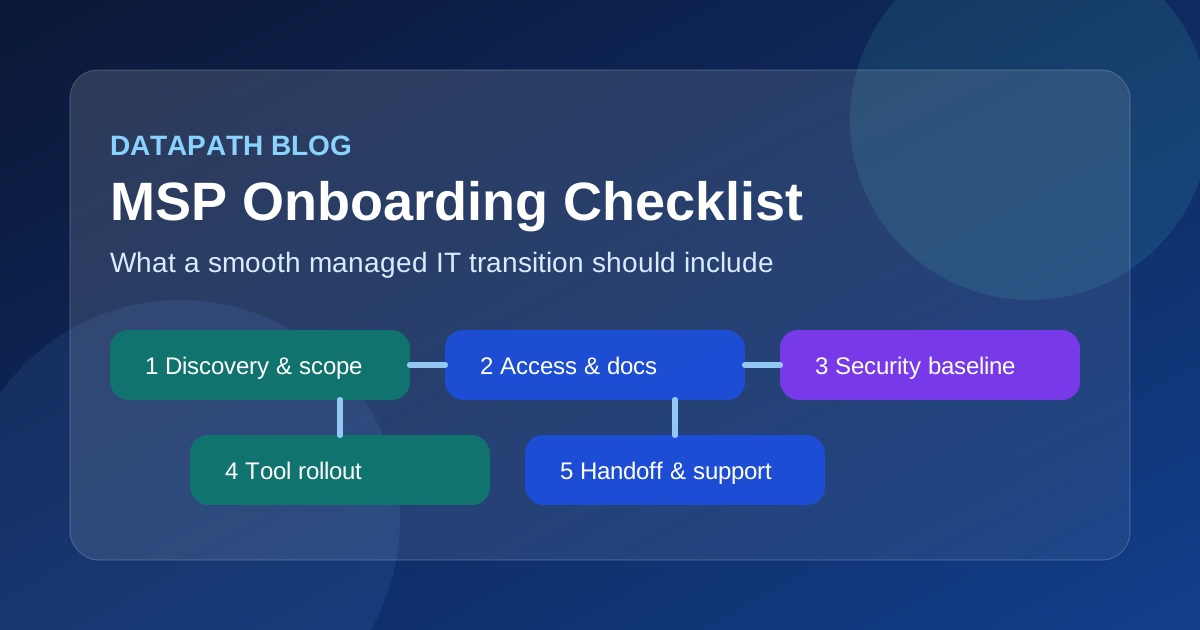

What should an MSP onboarding checklist include for a smooth managed IT transition?
A practical MSP onboarding checklist should include discovery, asset and account documentation, credential recovery, security baseline validation, tooling rollout, communication rules, escalation paths, and a clear handoff into ongoing support. The goal is not just to get agents installed and tickets flowing. It is to make sure the new managed IT relationship starts with fewer blind spots, fewer inherited risks, and a clearer operating model for both sides.12
That matters because the transition period is where a lot of managed IT relationships either build trust or quietly accumulate future problems. In our experience, clients do not get frustrated because onboarding contains too many checklist items. They get frustrated when the obvious things were skipped: nobody documented line-of-business systems, admin access was incomplete, the backup status was assumed instead of tested, or both sides thought they agreed on priority response expectations when they really did not.
We think a smooth managed IT transition should create momentum. By the end of onboarding, leadership should know who owns what, users should know how to get help, and the environment should be more visible and more governable than it was before the contract was signed. That is the same reason this topic connects naturally to our guidance on what managed IT services include, co-managed IT vs. managed IT, and MSP cost planning.
Why does MSP onboarding matter so much before support fully goes live?
A transition into managed IT is not just a vendor swap. It is a transfer of operational responsibility. Research from providers and MSP tooling vendors consistently points to the same pattern: onboarding sets the tone for trust, affects retention, and often determines whether the new provider can actually support the environment efficiently once steady-state work begins.23
The reason is simple. A provider cannot manage what it cannot see, cannot support what it cannot access, and cannot be accountable for systems nobody documented.
A strong onboarding process should reduce risk in a few specific ways:
- it exposes inherited infrastructure and security gaps early
- it clarifies the support scope before the first high-pressure incident
- it creates a usable documentation baseline
- it aligns client stakeholders on communication, escalation, and priorities
- it establishes the technical controls needed for recurring service delivery14
That is why we prefer to think of onboarding as the first phase of managed service delivery, not a side project that happens before the “real work” begins.
What information should be collected before technical onboarding starts?
The first stage should be discovery, and it should be deeper than a generic intake form. Good onboarding starts with understanding the client’s business model, critical workflows, IT pain points, and current risk profile before anyone starts changing tools or deploying agents.13
Which business and technical details should be documented first?
A solid discovery package should cover:
- primary business contacts and executive stakeholders
- locations, remote users, and critical operating hours
- line-of-business applications and dependencies
- servers, endpoints, cloud tenants, network gear, and wireless systems
- current vendors for internet, cybersecurity, telecom, and cloud services
- compliance or regulatory requirements that affect support or security
- current support pain points, recurring incidents, and unresolved risks12
We usually recommend documenting not just what exists, but what matters most. A complete list of devices is useful. A prioritized list of systems that would materially disrupt operations if they failed is more useful.
Why should discovery include a risk and security review?
Because inherited risk becomes your day-two problem almost immediately. Several MSP onboarding frameworks now emphasize a risk-first model that identifies exposure early instead of waiting for the first outage, ransomware scare, or failed backup restore to reveal what nobody checked.14
At minimum, onboarding should review:
| Area | What to validate | Why it matters |
|---|---|---|
| Identity | Admin roles, MFA status, shared accounts, stale users | Weak identity hygiene creates immediate support and security risk |
| Endpoints | Patch status, protection coverage, encryption, unsupported systems | Helps surface unmanaged or high-risk devices |
| Backups | Coverage, schedule, retention, restore confidence | Backup assumptions fail at the worst time |
| Network | Firewall access, segmentation, ISP dependencies, remote access | Reduces surprises during rollout and incident response |
| Vendors | Who still has access, who owns what, what contracts exist | Third-party confusion slows support and increases exposure |
That kind of review also ties directly into our broader cybersecurity risk assessment services approach. Onboarding is one of the best moments to identify whether the environment is merely messy or actively dangerous.
What operational and access items belong on every MSP onboarding checklist?
This is where a lot of transitions either become orderly or start to wobble.
How should credentials and privileged access be handled?
Any managed IT transition should include a full credential and access recovery process. That means confirming tenant-level admin rights, firewall and switch access, backup-console access, domain and DNS ownership, ISP portals, SaaS admin consoles, and emergency accounts before the prior provider disappears or the relationship turns tense.56
A useful checklist should explicitly confirm:
- where privileged credentials are stored
- whether break-glass accounts exist and are tested
- which third parties retain admin access
- whether MFA is enabled on critical admin accounts
- how shared credentials will be eliminated or rotated15
We would rather over-document access during onboarding than discover mid-incident that nobody knows who controls the registrar, the firewall, or the Microsoft 365 global admin account.
What documentation should be completed before go-live?
The documentation baseline should include:
- asset inventory
- network diagram or topology summary
- key system owners and business dependencies
- ISP, telecom, and circuit details
- backup schedule and recovery notes
- escalation matrix and contact list
- onboarding decisions, exclusions, and known risks24
The best version of this is not a static binder. It is living documentation tied to day-to-day support. That is what allows faster troubleshooting, cleaner handoffs, and better quarterly planning later.
Why do communication rules need to be formalized early?
Because unmanaged expectations create avoidable friction. The client should know how to open tickets, what counts as urgent, who can authorize changes, when after-hours escalation applies, and what communication they should expect during incidents or projects.27
A simple onboarding communication standard should answer:
- Who can submit requests on behalf of the client?
- What are the support channels and expected response windows?
- How are priority levels defined?
- Who approves changes, purchases, and emergency actions?
- Who receives service updates, incident notifications, and executive reporting?
That sounds basic, but it prevents a surprising amount of chaos.
What technical rollout steps should happen during onboarding?
Once discovery and access are under control, the onboarding checklist should move into rollout and validation.
Which tools and controls should be deployed first?
Most managed IT onboarding projects include deployment or validation of:
- remote monitoring and management agents
- endpoint protection and alerting tools
- patch management policies
- backup agents or backup monitoring
- asset discovery and inventory tooling
- remote support tools and approved automation workflows28
The exact order depends on the environment, but the principle is consistent: establish visibility first, then control, then optimization. You do not want to automate a system you do not yet understand.
What security baseline checks should be part of go-live prep?
A smooth transition should verify baseline controls such as MFA, encryption, patching, endpoint protection, administrative access discipline, and recovery readiness before support fully normalizes.28
We recommend treating these as required checkpoints rather than optional polish:
- MFA enforced for admin roles and high-risk users
- unsupported systems identified and tracked
- backup failures or coverage gaps documented
- endpoint protection active where expected
- critical alerts routed to the right response path
- obvious high-risk findings escalated to leadership with a remediation plan14
If those controls are not ready, the right move is to document the gap and make ownership explicit, not pretend the environment is cleaner than it is.
Why should onboarding include testing, not just setup?
Because installed does not mean operational. Good onboarding should test alerts, remote access, ticket routing, monitoring visibility, backup status, and at least some restore or recovery assumptions before declaring success.12
That is especially true for environments with multiple sites, compliance requirements, or regulated data. The client is not buying screenshots of configured tools. They are buying confidence that the operating model actually works.
How should the transition move from onboarding into steady-state managed IT?
This is the part many providers under-design. The onboarding checklist should not end with “agents installed.” It should end with a handoff into a durable service rhythm.
What should happen in the kickoff and handoff process?
The kickoff meeting should introduce points of contact, confirm timelines, review open risks, restate the support model, and align both sides on immediate next steps.12 Then the handoff into steady-state delivery should include:
- known issues and inherited risks log
- open remediation items with owners
- finalized support contacts and escalation paths
- first 30-day priorities
- reporting cadence and QBR expectations24
This is where onboarding becomes strategic. If the client leaves the transition with a clearer roadmap, stronger documentation, and a prioritized view of what to fix next, the relationship starts from a position of competence instead of confusion.
Which mistakes usually derail a managed IT transition?
The most common problems are not exotic. They are boring and preventable:
- incomplete admin access
- undocumented line-of-business systems
- weak communication about what is in or out of scope
- no clear owner for inherited security gaps
- rushed go-live with little testing
- assuming the former provider documented things accurately45
We think the right onboarding philosophy is simple: assume ambiguity exists, then remove it deliberately.
Why Datapath for managed IT onboarding and transition planning?
We approach onboarding as an accountability exercise, not a paperwork exercise. A smooth managed IT transition should leave your environment easier to see, easier to support, and easier to govern than it was before. That means cleaner documentation, tighter access control, clearer expectations, and a practical list of risks that leadership can actually act on.
For teams comparing providers, that distinction matters. A provider that onboards well is usually a provider that operates well. If your organization is evaluating a transition now, start with the Datapath homepage, review our managed IT services overview, compare the support model questions in our outsourced IT support guide, and talk with our team about what a smooth onboarding plan should look like in your environment.
Frequently Asked Questions
What is an MSP onboarding checklist?
An MSP onboarding checklist is a structured set of discovery, documentation, access, security, tooling, and communication tasks used to transition a client into managed IT services without avoidable confusion or operational risk.
How long should MSP onboarding take?
It depends on the size and complexity of the environment, but onboarding should take long enough to document systems properly, recover access, deploy core tools, validate security baselines, and align stakeholders before support fully goes live.2
What is the biggest risk during a managed IT transition?
Usually it is incomplete visibility. Missing credentials, undocumented systems, unclear ownership, and untested backups create the biggest early support and security problems during an MSP transition.14
What should clients prepare before onboarding with a new MSP?
Clients should prepare stakeholder contacts, vendor lists, system inventories if available, current support pain points, compliance requirements, known open issues, and access to critical admin consoles and service providers.
Should onboarding include security remediation or just documentation?
It should include both. Documentation creates visibility, but onboarding should also identify obvious high-risk conditions and either remediate them immediately or assign clear ownership and timelines so the risk does not remain vague.
Sources
Footnotes
-
Guardz: The Complete MSP Guide to Client Onboarding ↩ ↩2 ↩3 ↩4 ↩5 ↩6 ↩7 ↩8 ↩9 ↩10
-
NinjaOne: MSP Client Onboarding Best Practices and Checklist ↩ ↩2 ↩3 ↩4 ↩5 ↩6 ↩7 ↩8 ↩9 ↩10 ↩11
-
IT Portal: MSP Onboarding Checklist Framework for Clients ↩ ↩2 ↩3 ↩4 ↩5 ↩6 ↩7
-
Freshworks: MSP Best Practices for Onboarding and Security ↩ ↩2
