
What is a backup retention policy?
A backup retention policy defines how long each backup copy is kept before it is overwritten, archived, preserved, or deleted. The best backup retention policy is a documented schedule that maps daily, weekly, monthly, annual, immutable, archive, and legal-hold copies to recovery objectives, compliance obligations, storage cost, ransomware risk, and restore testing.
If you are looking for backup retention policy best practices, the short answer is: classify the data, set different retention windows by system and risk, keep immutable recovery copies, separate backup from archive and legal hold, test restores against the schedule, and review the policy after major business, regulatory, or technology changes.
For most organizations, backup retention should not be one flat number. Short-term operational backups, monthly recovery points, annual archive copies, immutable ransomware copies, legal-hold sets, Microsoft 365 data, database snapshots, and security logs all serve different purposes. Treating all of them the same usually creates either recovery gaps or unnecessary storage and legal exposure.
That distinction matters because NIST contingency planning guidance says backup and recovery strategies should be based on business-impact analysis, allowable downtime, recovery priorities, backup frequency, backup scope, storage location, media rotation, and testing.12 CISA also recommends offline, encrypted backups and regular testing as part of ransomware resilience.3
Need a backup retention policy reviewed for recovery, cost, cyber insurance, legal hold, or compliance? Schedule a backup and recovery assessment with Datapath.
Use this guide alongside Datapath’s disaster recovery services, Microsoft 365 backup services, data storage consulting services, backup and disaster recovery guide, disaster recovery testing checklist, immutable backup strategy for ransomware, and Microsoft 365 backup vs retention guide.
Need cloud document backup with legal-hold clarity?
Datapath helps teams compare Microsoft 365 backup, retention, restore testing, legal-hold workflows, archive strategy, and recovery evidence before a deletion or audit turns urgent.
| If you searched for… | This article answers… |
|---|---|
| backup retention policy | What the policy should define and who should approve it |
| backup retention policy review | Which retention windows, restore tests, legal holds, audit trails, and cost controls need a second look |
| backup solution for cloud documents that supports legal hold and retention policies | How to compare Microsoft 365, cloud document, archive, and legal-hold requirements |
| Office 365 backup retention | Why Microsoft 365 retention, legal hold, and backup recovery need separate decisions |
| backup retention policy best practices | How to balance recovery, compliance, storage cost, and legal risk |
| recommended backup retention policy | A practical starting schedule for business systems |
| backup retention policy examples for small business | Example daily, monthly, yearly, immutable, and archive windows |
| how long to keep backups for compliance | How legal, tax, contract, regulated-record, investigation, and business needs affect retention |
| legal requirements for backup data retention | How tax, healthcare, financial, contract, and legal-hold drivers affect retention |
| legal hold process and backup retention policies | How normal expiration pauses, who approves the hold, and what release evidence is needed |
| how often should backup policies be reviewed and tested | When to review the policy and how often to test restores |
| best data retention policies and audit trails in a backup platform | Which evidence, logs, exports, restore reports, and deletion records matter |
| what backup retention policies balance cost and compliance | How to reduce storage sprawl without deleting required recovery or legal evidence |
| how to set backup retention policies to reduce storage costs | How to tier retention without deleting the only useful recovery point |
| regulated environment backup | How healthcare, finance, municipal, education, and other regulated environments should document retention |
Backup retention policy best practices checklist
A backup retention policy should be short enough for leadership to read but specific enough for IT, compliance, and vendors to execute. These best practices turn the policy from a generic retention statement into a usable recovery, compliance, and cost-control document. Start with the checklist below before arguing about exact day counts.
| Checklist item | What to document | Why it matters |
|---|---|---|
| Systems in scope | Servers, databases, Microsoft 365, SaaS apps, file shares, endpoints, network configs, line-of-business apps | Prevents unprotected data from being assumed recoverable |
| Data category | Financial, HR, customer, clinical, student, public records, contracts, logs, intellectual property | Retention periods should follow business and regulatory purpose |
| Recovery objective | RTO, RPO, maximum tolerable downtime, restore priority | Tells the backup team how much data loss and downtime the business can tolerate |
| Short-term retention | Daily or more frequent operational restore window | Covers routine deletions, corruption, and fast rollback needs |
| Monthly retention | Month-end or recurring historical recovery points | Helps when issues are found after the daily window expires |
| Long-term retention | Annual, archive, tax, contract, or regulated-record windows | Keeps long-range records intentionally instead of accidentally |
| Immutable retention | Offline, immutable, or isolated copies with administrative separation | Protects against ransomware and privileged account compromise |
| Legal hold | Who can suspend deletion and which systems are affected | Prevents normal retention automation from deleting preserved material |
| Deletion and disposal | When old copies expire and how disposal is logged | Reduces over-retention, storage drift, and unnecessary legal exposure |
| Restore testing | Test frequency, sample systems, evidence, and owners | Proves the retained copies are actually usable |
| Exceptions | Approved deviations, reason, owner, review date | Keeps one-off requirements from becoming permanent sprawl |
The policy owner should be named. In smaller businesses, that may be the owner, controller, operations leader, or IT manager. In regulated or multi-site organizations, ownership often sits across IT, security, legal, compliance, and finance.
Recommended backup retention policy schedule for businesses
There is no universal backup retention period that fits every business. A useful backup retention policy schedule starts with criticality, recovery needs, and obligations, then adjusts by system. The table below is a practical starting point for businesses comparing backup retention policy examples, not legal advice.
| Backup or data tier | Common starting window | Best fit |
|---|---|---|
| Hourly or frequent snapshots | 24 hours to 7 days | High-change databases, file shares, and systems where recent rollback matters |
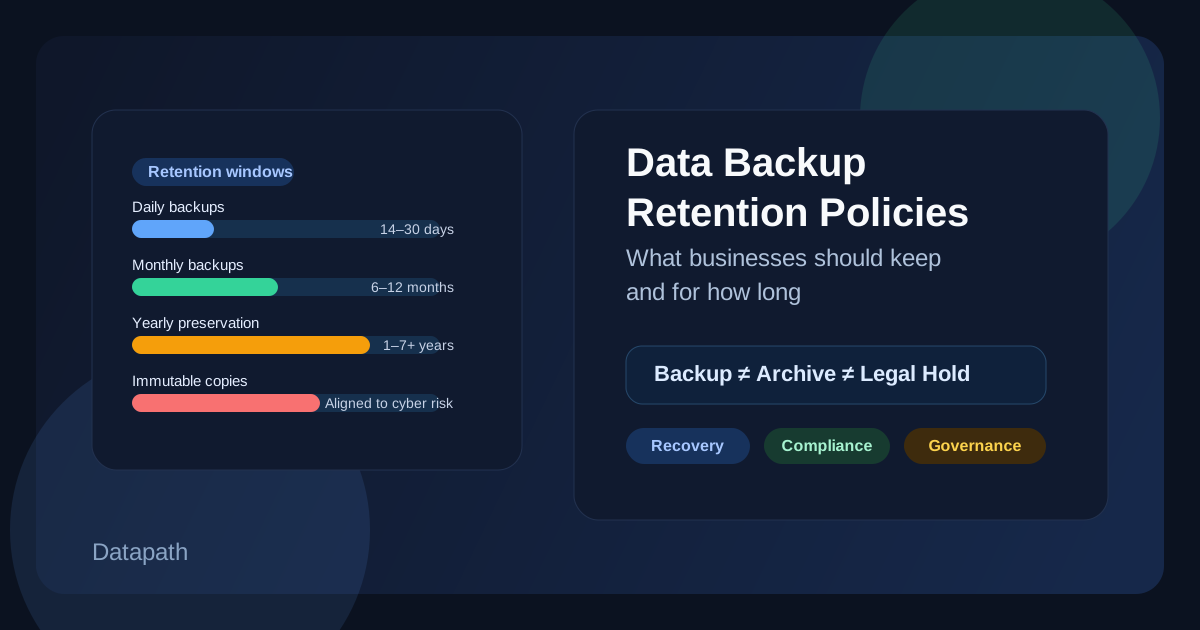
| Daily operational backups | 14 to 35 days | Routine restores, accidental deletion, short-lived corruption, user error |
| Weekly backups | 8 to 12 weeks | Broader rollback coverage without keeping every daily copy |
| Monthly recovery points | 12 to 24 months | Month-end business snapshots, finance review, slow-moving data issues |
| Annual or long-term copies | 3 to 7 years, or longer when required | Tax, contract, audit, public-sector, regulated, or historical records |
| Immutable ransomware copies | 30 to 90 days, adjusted for threat detection and incident response needs | Recovery from malware, destructive admin actions, or delayed incident discovery |
| Legal-hold sets | Until released by legal or leadership authority | Litigation, investigation, regulatory review, or formal preservation demand |
| Security and audit logs | Based on detection, insurance, compliance, and investigation needs | Incident response, audit evidence, access review, and control validation |
Many businesses use a Grandfather-Father-Son model, often shortened to GFS, where daily backups roll into weekly, monthly, and yearly retention tiers. That model is useful because it preserves historical depth without keeping every daily copy forever. It still needs clear exceptions for regulated records, legal hold, and ransomware recovery.
The 3-2-1 backup rule is related but different. It helps define copy placement, such as multiple copies across different media with an offsite or isolated copy. It does not answer how long each copy should be retained. A good policy needs both copy architecture and retention windows.
Backup retention period best practices
The best backup retention period is not a universal number. It is a recovery decision tied to how far back the organization may need to investigate, restore, and prove that the restored copy is trustworthy. A company can have frequent recent backups and still fail if corruption, account compromise, or unauthorized changes began weeks before anyone noticed the problem.
When setting a backup retention period, work backward from operational scenarios instead of vendor defaults:
| Retention-period question | Why it matters |
|---|---|
| How long could deletion, corruption, ransomware, or account compromise go unnoticed? | The clean restore point may need to predate discovery by days or weeks. |
| Which systems must return first during downtime? | Identity, EHR, student information systems, finance, dispatch, and network access may need different retention and restore priorities. |
| Which copies are application-consistent and independently protected? | A snapshot in the same compromised environment may not be a usable backup. |
| What evidence proves the retained copy restored correctly? | Testing should record restore point selected, elapsed recovery time, data verified, permissions checked, and gaps remediated. |
| Which older records belong in archive or legal hold instead of ordinary backup storage? | Backup retention should not become unmanaged permanent records retention. |
For regulated and mid-market teams, the practical best practice is to define retention by workload: short windows for routine rollback, deeper monthly points for delayed discovery, immutable or isolated copies for ransomware recovery, and separate archive or legal-hold controls for records that must be preserved beyond operational recovery needs.
How long should businesses keep backups for compliance?
Backups should be kept long enough to support the recovery point the business may realistically need, plus any legal, regulatory, contractual, or investigation requirement that applies. They should not be kept indefinitely unless the organization can defend that choice.
For daily operational backups, many businesses start with several weeks. For monthly copies, one to two years may be useful when late-discovered issues matter. For annual records, tax, contract, or regulated requirements may push retention to several years. For immutable ransomware copies, the window should reflect how long an intrusion could remain undiscovered before the organization notices it.
The best question is not “how long can our backup tool keep this?” It is “what incident, audit, dispute, or business process would require this copy, and who approved keeping or deleting it?”
Use this compliance-oriented filter before setting a retention window:
| Retention driver | Question to answer |
|---|---|
| Recovery | How far back would the business reasonably need to restore after deletion, corruption, ransomware, or outage? |
| Tax and finance | Which records does finance need to preserve for tax, audit, payroll, contract, or accounting support? |
| Regulated data | Which healthcare, financial, education, municipal, customer, or contractual records have specific requirements? |
| Legal hold | Which custodians, systems, records, dates, or matters must be preserved until formally released? |
| Privacy and disposal | Which data creates avoidable exposure if it is kept longer than the approved business purpose? |
| Cost | Which copies are redundant, low-value, or better suited for archive instead of active backup storage? |
Legal requirements for backup data retention
Legal requirements for backup data retention depend on the data, industry, jurisdiction, contracts, and purpose of the record. Backups are not a shortcut around records-retention law, privacy obligations, discovery obligations, or secure disposal rules.
Here are common official reference points IT leaders should account for:
| Context | Official retention signal | Practical implication |
|---|---|---|
| Federal tax records | The IRS lists common periods such as 3 years, 6 years for certain underreported income situations, 7 years for some bad debt or worthless securities claims, indefinite retention for missing or fraudulent returns, and at least 4 years for employment tax records.4 | Backup and archive policy should map tax and payroll records to finance-approved retention windows. |
| Financial institutions under the FTC Safeguards Rule | The eCFR version of 16 CFR 314.4 requires procedures for secure disposal of customer information no later than two years after last use unless business, legal, regulatory, or feasibility exceptions apply.5 | Retention should include deletion and disposal, not only backup preservation. |
| HIPAA-regulated entities | HHS says the Security Rule requires backup, disaster recovery, and emergency mode operation procedures for ePHI, and documentation must be maintained for six years after creation or last effective date.67 | Healthcare backup retention should separate ePHI recovery, Security Rule documentation, audit evidence, and state medical-record rules. |
| Cyber insurance and contracts | Policies and customer agreements may require defined retention, immutability, testing, encryption, or recovery evidence. | Treat policy language and contract obligations as retention inputs. |
| Legal hold or investigation | Normal deletion may need to stop for specific data, custodians, systems, or time periods. | Backup administrators need a documented hold workflow and release process. |
For regulated environments, the policy should cite the specific rule, contract, or business reason behind the retention period. A vague “seven years for everything” schedule may feel simple, but it often over-retains low-value data and under-documents the systems that matter most.
How does legal hold intersect with backup retention policies?
Legal hold intersects with backup retention when normal expiration, deletion, or overwrite rules must pause for specific data. The hold should name the matter, approver, custodians, systems, time period, preservation method, evidence owner, and release process. Without that detail, IT may either delete data that should be preserved or keep everything indefinitely because nobody is comfortable approving disposal.
Backup administrators should not guess at legal scope. The policy should define who can place a hold, who can release it, how the hold is documented in backup, archive, Microsoft 365, file-share, SaaS, or storage systems, and how restored or exported data is tracked. Datapath can help connect the technical workflow to data storage consulting services and Microsoft 365 backup services, while legal interpretation should remain with qualified counsel.
How should cloud document backup support legal hold and retention policies?
A backup solution for cloud documents should support recovery first, then align with legal hold, retention, and archive workflows without pretending those controls are identical. That distinction is especially important for Microsoft 365, SharePoint, OneDrive, Teams-related files, Google Workspace, finance folders, HR records, legal files, and executive communications.
When comparing cloud document backup platforms or providers, ask whether they can show:
- Exchange, SharePoint, OneDrive, Teams-related, and endpoint-file coverage by workload
- restore points that match business RPO and RTO expectations
- legal-hold workflow coordination with Microsoft Purview, archive systems, counsel, or compliance owners
- audit trails showing who changed retention, restored data, exported data, or released a hold
- item-level and site-level recovery for specific files, folders, mailboxes, libraries, or custodians
- separation between backup admins, legal-hold approvers, and ordinary users
- restore-test evidence that compliance and IT teams can understand
- cost and storage impact when long-term retention or legal hold expands
Backup should not be the only legal-hold control. Legal hold usually needs a preservation workflow, approval path, scope definition, release process, audit trail, and coordination with records retention. Backup then supports recoverability and, in some cases, retrieval of specific historical items. Datapath helps teams connect those pieces through Microsoft 365 backup services and data storage consulting services so cloud document recovery does not depend on vague assumptions.
What audit trails should a backup or archiving platform provide?
A backup or archiving platform should provide audit trails for retention changes, backup job success or failure, restore requests, exported data, legal-hold placement and release, administrator actions, deletion or expiration events, policy exceptions, and failed restore tests. The audit trail should be easy to export for leadership, cyber insurance, customer diligence, legal review, or compliance evidence.
When comparing platforms, ask whether reports show:
- who changed a retention policy and when
- who restored, exported, or deleted data
- which workload, custodian, mailbox, site, folder, database, or system was affected
- which legal hold, retention rule, or exception applied
- whether restore testing passed or failed
- what remediation happened after a failed backup, missed job, or failed restore
This is where backup retention connects to operating accountability. A platform can have strong retention features and still leave the business unable to prove who changed what, which data was preserved, or whether the retained copy can actually restore.
How should Office 365 backup retention be handled?
Office 365 backup retention should start with the business systems that depend on Microsoft 365: email, SharePoint libraries, OneDrive folders, Teams-related files, executive mailboxes, finance records, HR documents, and customer communications. Then define which data needs fast restore, which data needs longer retention, which data belongs in archive or legal hold, and which data should expire on purpose.
Microsoft 365 retention, recycle bins, version history, legal hold, and eDiscovery are useful controls, but they are not the same thing as a tested business backup plan. A practical Office 365 backup retention plan should define workload scope, retention tiers, restore-test cadence, admin separation, legal-hold coordination, reporting, and the evidence leadership expects after a deletion, ransomware event, tenant mistake, or audit request.
Backup retention best practices
The strongest backup retention policies share a few traits.
Classify data before setting retention periods
Do not let the backup product become the records-retention policy by default. Group data by business purpose, sensitivity, recovery need, and obligation. Finance records, clinical records, student data, network configurations, endpoint images, Microsoft 365 files, and security logs should not inherit one identical setting without review.
Separate backup from archive and legal hold
Backup exists to restore operations. Archive exists to preserve records for reference, compliance, history, or audit. Legal hold exists to preserve relevant information when deletion must pause. A single backup repository should not be expected to perform all three roles without clear controls.
Align retention with RTO and RPO
RTO tells the business how quickly a system must return. RPO tells the business how much data loss is tolerable. Retention tells the business how far back recovery remains possible. Those three answers should be reviewed together, not in separate documents.
Keep immutable or isolated recovery copies
Ransomware changes the retention conversation. If attackers can delete backups or encrypt every reachable copy, a long retention schedule may still fail. CISA recommends offline, encrypted backups and regular testing because many ransomware events target recoverability directly.3
Test restores against the retention schedule
Testing should prove more than “a backup job succeeded.” It should verify that the organization can restore the right system, from the right point in time, within the expected recovery window. NIST says testing helps evaluate plan viability, staff readiness, and deficiencies, and that test schedules should be stated in the contingency plan policy statement.2
Review the policy after significant change
Retention should be reviewed at least annually and whenever major systems, vendors, business processes, regulations, legal matters, cyber insurance requirements, or recovery priorities change. NIST says contingency plans should be reviewed for accuracy and completeness at an organization-defined frequency or when significant changes occur.2
What backup retention policies balance cost and compliance?
Backup retention can reduce storage costs without weakening recovery if the business moves from flat retention to tiered retention. The goal is to preserve useful recovery depth while deleting redundant or low-value copies on purpose.
Start with these moves:
- Replace “keep everything forever” with daily, weekly, monthly, and yearly tiers.
- Keep high-frequency snapshots only where fast rollback is truly needed.
- Move long-term records into archive storage when rapid restore is not required.
- Deduplicate data and remove stale workloads from backup jobs.
- Separate legal hold from ordinary backup retention.
- Review SaaS, Microsoft 365, endpoint, and cloud snapshot retention independently.
- Expire backups only after restore tests prove newer tiers cover the actual recovery need.
Cost reduction is a governance exercise before it is a storage setting. If nobody knows why a copy exists, nobody will feel safe deleting it. A good policy makes deletion safer because it documents the reason, approver, and exception path.
What should be in a backup retention policy template?
Use this template as a working outline for leadership, IT, compliance, and vendor review.
| Template section | What to include |
|---|---|
| Purpose | Recovery, compliance, cost control, ransomware resilience, legal hold, audit evidence |
| Scope | Systems, SaaS platforms, endpoints, databases, file shares, logs, applications, vendors |
| Data classification | Business criticality, sensitivity, regulated status, owner, retention driver |
| Retention schedule | Daily, weekly, monthly, yearly, immutable, archive, and legal-hold windows |
| Recovery objectives | RTO, RPO, maximum tolerable downtime, restore priority |
| Storage architecture | Onsite, offsite, cloud, immutable, air-gapped, encrypted, geographically separated |
| Access control | Backup admin roles, MFA, separation of duties, vendor access, break-glass access |
| Deletion and disposal | Expiration rules, secure disposal, exception handling, evidence logs |
| Legal hold | Trigger, approver, scope, preservation method, release process |
| Restore testing | Frequency, systems tested, evidence required, failed-test remediation |
| Review cadence | Annual review, renewal review, major-change review, incident-driven update |
| Vendor accountability | SLAs, reporting, exportability, audit evidence, support during recovery |
Store the policy somewhere the recovery team can access during an outage. NIST guidance recommends making contingency plans and supporting information available where they are needed during recovery, including alternate-site and backup-media considerations.2
Backup retention examples for small business
A small business with Microsoft 365, a line-of-business application, accounting data, endpoint files, and a cloud backup provider might start with this kind of model:
| Data type | Example retention approach |
|---|---|
| Microsoft 365 email and files | Independent backup with daily recovery points for 30 to 90 days, monthly points for 12 months, and legal-hold handling where needed |
| Accounting and tax records | Archive aligned to finance and IRS recordkeeping requirements, with backup copies that support restore and audit access |
| Line-of-business database | Frequent snapshots for recent rollback, daily backups for operational recovery, monthly points for historical recovery |
| File shares | Daily backups for 30 days, monthly copies for 12 months, annual copies for records with business or contract value |
| Security logs | Retention based on incident investigation, insurance, compliance, and detection requirements |
| Critical admin documentation | Secure copy stored outside the primary environment with the recovery plan |
This is not a universal policy. It is a starting conversation. The final answer should reflect the business impact of losing each system, how quickly loss would be discovered, and which records must be retained or deleted under real obligations.
How often should backup policies be reviewed and tested in an enterprise environment?
Backup retention policies should be reviewed at least annually and after significant changes to systems, vendors, regulations, business processes, legal matters, or cyber insurance requirements. Restore testing should happen on a documented schedule and after major backup architecture changes.
For higher-risk systems, annual testing is rarely enough. Healthcare, finance, municipal, education, and multi-site environments often need a mix of tabletop exercises, file-level restores, application restores, Microsoft 365 restores, database restores, and full disaster recovery tests. The test should generate evidence: date, system, restore point, duration, issues, owner, and remediation.
If a backup has never been restored, it should not be treated as proven. A green backup dashboard is useful, but it is not the same as confirmed recoverability. Teams that need a formal test cadence can pair this retention schedule with Datapath’s hybrid cloud disaster recovery services and healthcare disaster recovery planning when uptime or regulated evidence is part of the requirement.
Why Datapath recommends reviewing backup retention before renewal
Backup contracts, Microsoft 365 backup tools, cloud repositories, EDR isolation rules, immutable storage, and disaster recovery services often renew separately. That can leave leadership with a fragmented retention model even when every tool is technically working.
Reviewing backup retention before renewal helps answer practical questions:
- Are the most important systems actually in scope?
- Are immutable copies protected from compromised administrators?
- Are Microsoft 365, SaaS, and endpoint data covered separately from server backups?
- Can the provider show restore-test evidence, not just job-success screenshots?
- Are retention windows tied to RTO, RPO, legal, compliance, and cost decisions?
- Does the contract define support during ransomware recovery or disaster recovery?
- Can old data be deleted or exported when the business needs to reduce exposure?
Datapath helps organizations connect backup retention, recovery testing, Microsoft 365 protection, cyber insurance evidence, regulated-industry requirements, and managed IT operations into a plan the business can actually use. If your backup environment has grown without a clear retention model, schedule a backup and recovery assessment.
FAQ: backup retention policy checklist
What is a backup retention policy?
A backup retention policy defines how long backup copies are kept, why each copy exists, who owns the decision, when copies expire, and how restore testing proves the business can recover the right data.
What is a backup retention policy review?
A backup retention policy review checks whether retention windows, restore tests, legal-hold workflows, audit trails, secure disposal, cloud document backup, immutable copies, storage costs, and compliance drivers still match the business.
What is a recommended backup retention policy for a business?
A common starting point is daily backups for several weeks, weekly backups for several months, monthly recovery points for one to two years, annual records for approved long-term needs, and immutable copies for ransomware recovery. The exact schedule should follow business impact, legal requirements, and restore testing.
How long should a small business keep backups?
A small business should usually keep short-term operational backups for weeks, monthly recovery points for at least a year where historical recovery matters, and longer records only when tax, contract, legal, or business requirements justify them.
What are backup retention policy best practices?
Best practices include classifying data, separating backup from archive and legal hold, mapping retention to RTO and RPO, protecting immutable copies, testing restores, documenting exceptions, and reviewing the schedule after major changes.
Is backup retention the same as records retention?
No. Backup retention controls recoverable copies used for restoration. Records retention controls how long business records must be kept or disposed. They should be aligned, but they are not the same control.
How should cloud document backup support legal hold and retention policies?
Cloud document backup should preserve recoverable copies for Exchange, SharePoint, OneDrive, Teams-related files, or other cloud documents while legal hold and retention workflows define what must be preserved, who approved it, when it can be released, and what audit evidence is retained.
Is Office 365 backup retention the same as Microsoft retention or legal hold?
No. Office 365 backup retention defines how long recoverable backup copies are kept. Microsoft retention and legal hold preserve or dispose of records for policy, compliance, or legal reasons. They should be coordinated, but each control has a different purpose.
How long should businesses keep backups for compliance?
Businesses should keep backups long enough to support recovery, legal, tax, contract, regulated-record, investigation, and cyber-insurance needs, then expire copies when the approved purpose ends. The policy should cite the specific driver instead of using one generic period for every system.
How does legal hold intersect with backup retention policies?
Legal hold can pause normal expiration or deletion for specific custodians, systems, records, dates, or matters. The process should define who can place and release the hold, how preservation is documented, and how restored or exported data is tracked.
What audit trails should a backup or archiving platform provide?
It should log retention changes, backup job results, restore requests, exports, legal-hold placement and release, administrator actions, deletion events, policy exceptions, failed tests, and remediation evidence.
How often should backup policies be reviewed and tested in an enterprise environment?
Review backup policies at least annually and after significant changes. Test restores on a documented schedule, with more frequent testing for critical systems, regulated data, cyber insurance requirements, and major backup architecture changes.
What backup retention policies balance cost and compliance?
They reduce storage costs by replacing indefinite retention with daily, weekly, monthly, yearly, archive, and legal-hold tiers. The business keeps recovery depth where it matters and expires redundant copies with documented approval.
What legal requirements affect backup data retention?
Tax, employment, healthcare, financial, contract, privacy, discovery, public-records, and industry-specific requirements can all affect backup data retention. The policy should cite the specific rule or contract instead of relying on generic time periods.
Should businesses keep all backups forever?
Usually no. Keeping all backups forever increases cost, legal exposure, privacy risk, and operational complexity. Keep data when there is a clear recovery, compliance, legal, or business reason, and document when deletion is appropriate.
Does the 3-2-1 backup rule define retention periods?
No. The 3-2-1 rule helps define copy placement and resilience. Retention periods define how long each copy is kept. A complete backup strategy needs both.
Sources
- NIST SP 800-34 Rev. 1: Contingency Planning Guide for Federal Information Systems
- NIST SP 800-34 Rev. 1 PDF
- CISA StopRansomware Guide
- IRS: How long should I keep records?
- eCFR: 16 CFR 314.4, FTC Safeguards Rule elements
- HHS: Summary of the HIPAA Security Rule
- eCFR: 45 CFR 164.316, HIPAA policies and procedures documentation requirements