
How should teams respond to a compromised Microsoft 365 email account?
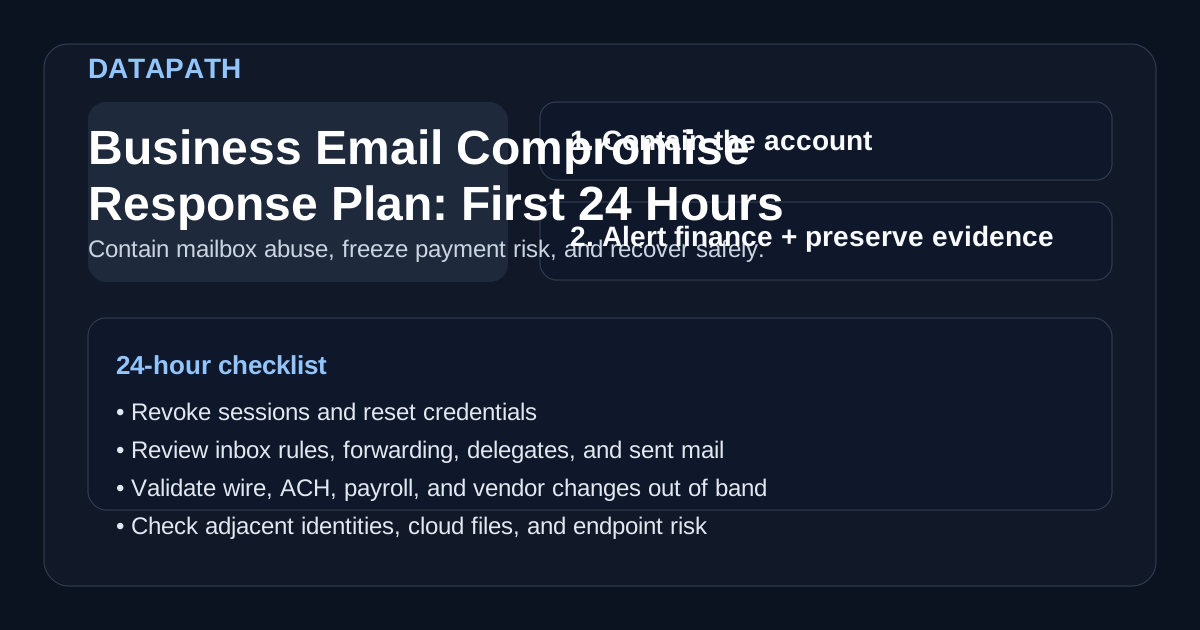
When responding to a compromised email account in Microsoft 365, start by containing the account, revoking active access, preserving evidence, reviewing MFA and mailbox changes, stopping payment-risk workflows, notifying targeted recipients, and restoring access only after identity and endpoint risk are understood. The goal is to stop fraud and persistence, not just reset a password.123
That distinction matters because business email compromise is usually an operational attack, not just an inbox problem. Attackers study how a company approves payments, who can influence vendors, which employees handle payroll or wire transfers, and how internal trust works. Once they gain access, they move fast. In our experience, the most expensive failures happen when teams treat BEC like ordinary phishing clean-up instead of a finance, identity, and communications incident.
This article is intentionally aligned with Microsoft Learn’s compromised-email-account response flow because the mailbox work is where many teams start. But the first 24 hours also need finance controls, leadership decisions, bank escalation, and evidence capture. The 2025 FBI IC3 report says reported losses surpassed $20.877 billion, with business email compromise following investment fraud as one of the largest loss categories.1
For mid-market organizations, the first 24 hours should answer five practical questions:
- Which account or accounts are compromised?
- Did the attacker change forwarding, inbox, MFA, or delegated-access settings?
- Did they send fraudulent messages, payment requests, or payroll changes?
- Did they access files, SharePoint, or other connected cloud resources?
- What must be frozen, reported, or escalated immediately?
If your search started with “responding to a compromised email account” in Microsoft Learn, use the Microsoft sequence as the account-recovery baseline and add the business email compromise controls below.
| Search or incident signal | First 24-hour focus | Datapath service route |
|---|---|---|
| responding to a compromised email account Microsoft Learn | Disable or restrict the account, revoke sessions, review MFA, inspect app consent and roles, and remove suspicious forwarding | Incident response retainer services for finance holds, evidence capture, and leadership coordination |
| business email compromise response steps | Sequence mailbox containment, payment-risk review, recipient notices, and recovery signoff before the account is trusted again | Microsoft 365 phishing protection services for policy tuning and post-incident email-security hardening |
| business email compromise incident response steps | Treat the mailbox as an incident path that can involve finance, legal, insurance, customer communication, and broader identity risk | Microsoft 365 identity security services for MFA, session, privilege, and conditional-access review |
Need help responding to a compromised Microsoft 365 account?
Datapath can help review Microsoft 365 account compromise, mailbox rules, finance exposure, evidence gaps, and the incident response path before a payment-fraud scare turns into chaos.
How do Microsoft Learn compromised-email-account steps map to BEC response?
Microsoft Learn’s compromised-email-account guidance starts with account containment: disable or restrict the affected user, revoke access, review MFA methods, inspect user-consented applications, check admin roles, and remove suspicious mail forwarding. A BEC response plan should use those steps, then add finance verification and recipient notification.2
| Microsoft 365 response area | Why it matters for BEC | Datapath response check |
|---|---|---|
| Disable or restrict the account | Stops active attacker use while the team investigates | Confirm no business-critical approval path depends on the account during containment |
| Revoke sessions and tokens | Blocks access that survives a password reset | Verify sign-out, refresh-token revocation, app passwords, and legacy auth exposure |
| Review MFA methods | Attackers sometimes add their own methods for persistence | Remove unrecognized methods and validate phishing-resistant MFA for high-risk users |
| Review app consent and admin roles | OAuth grants and excess roles can widen the blast radius | Remove suspicious apps and confirm no privilege path was abused |
| Check forwarding and inbox rules | Hidden rules can hide replies or exfiltrate mail | Remove forwarding, delegate, transport, deletion, and archive rules tied to the attack |
That mapping matters for searchers using Microsoft Learn as their source of truth. The Microsoft checklist is a strong technical baseline. Datapath extends it into the business side of BEC: wire holds, vendor-bank-change verification, customer or vendor correction notices, insurer/counsel coordination, and the leadership report that explains what happened.
Why is the first 24 hours so important?
Because attackers do not usually stop at reading email. The FBI describes business email compromise as one of the most financially damaging online crimes because it exploits the way organizations rely on email for legitimate business requests.3 Microsoft’s incident-response guidance makes the same operational point from the mailbox side: once an attacker controls user credentials, they may gain access not only to the mailbox but also to associated Microsoft 365 services like SharePoint and OneDrive.2
That means the first day is usually a race against three kinds of damage:
1. Payment fraud
Attackers often impersonate executives, vendors, or finance staff to change wiring instructions, rush invoice approvals, or redirect payroll. If your team discovers the compromise after money moves, recovery becomes harder and more time-sensitive.
2. Internal trust abuse
A real mailbox gives the attacker credibility. They can email coworkers, request documents, ask for MFA codes, or target the next employee in the approval chain. That is why internal notification cannot wait until the investigation is perfect.
3. Broader identity and data exposure
A compromised mailbox can expose sensitive attachments, contact graphs, password-reset messages, contracts, and shared cloud links. If the same identity has excessive privileges, the attacker may also reach file storage, Teams, CRM systems, or admin consoles.2
What should happen in the first hour?
The first hour should focus on containment, not debate. A usable business email compromise response plan should give IT and leadership a short checklist they can execute immediately.
Disable active abuse paths
Start by restricting the account so the attacker cannot keep using it. Depending on your environment, that usually means disabling sign-in temporarily or forcing a sign-out across active sessions, resetting the password, revoking refresh tokens, and requiring a fresh MFA challenge.2
Preserve evidence before you overwrite the story
Containment comes first, but you still need to preserve enough evidence to understand what happened. Capture the alert, affected username, timestamps, suspicious messages, mail traces, sign-in history, forwarding settings, inbox rules, and any observed IP or geolocation indicators. If your tooling supports it, preserve mailbox and audit evidence before a broad cleanup step removes useful context.
Alert finance immediately
If the user works in accounting, payroll, AP, AR, procurement, or executive operations, alert finance at once. Even if you do not yet know whether fraudulent payment instructions were sent, pause unusual wire activity, vendor bank-change requests, and urgent payment approvals until someone validates them out of band.
Notify a small internal response group
In the first hour, we usually recommend a tight working group:
- IT or security lead
- finance owner if payment activity is possible
- executive sponsor or operations lead
- legal/compliance lead if regulated data may be involved
- outside IT/security partner if the internal team needs help fast
The point is to keep decisions moving while avoiding noisy, contradictory internal messages.
What mailbox checks should happen next?
After the account is contained, the response plan should force a structured mailbox review. Microsoft specifically recommends looking for malicious activity and configuration changes when responding to compromised email accounts.2
Review forwarding, inbox, and deletion rules
Attackers often create hidden or easy-to-miss rules that forward messages externally, move replies into RSS or archive folders, or delete vendor and bank correspondence before the real user sees it. A strong response plan should require teams to review and remove:
- forwarding addresses
- inbox and transport rules
- delegated mailbox permissions
- send-as or send-on-behalf changes
- suspicious mobile-device or OAuth app connections
Check sent mail and deleted items
Review what the attacker sent, not just what they received. Look for vendor-payment requests, payroll changes, gift card scams, MFA phishing, document requests, password reset attempts, or internal impersonation. Then confirm whether users or external recipients need a correction notice.
Review sign-in history and impossible access patterns
Check where the account was accessed, what client apps were used, whether legacy authentication appeared, and whether there were multiple suspicious sign-ins across time zones or geographies. That helps answer whether this was a one-off phish, credential stuffing, session hijacking, or a broader identity problem.
What should finance and operations do in the first 24 hours?
A good business email compromise response plan treats finance as a core response function, not an afterthought.
Validate recent payment activity
Review:
- recent wire transfers
- ACH changes
- vendor banking updates
- payroll direct-deposit changes
- urgent invoice approvals
- any payment request tied to the compromised user’s mailbox
If a fraudulent transfer may have been sent, contact the sending bank immediately and escalate through the institution’s fraud process. NCUA guidance for cloud-based email BEC notes that reporting to IC3 within 24 hours increases the chance of recovering funds wired under fraudulent pretenses.4 Time matters.
Move sensitive approvals out of email temporarily
For the next day or two, high-risk approvals should not rely on a simple email reply. Use a verified phone call, ticket workflow, finance system approval, or another out-of-band method for any material payment, vendor banking change, or executive request.
Notify targeted external parties when needed
If the attacker messaged customers, vendors, payroll providers, or banks from the real account, the response plan should include a short validation notice that tells recipients to distrust recent payment changes until verified. Keep that message factual and narrow. The goal is to prevent more losses, not create panic.
How should identity and endpoint teams respond?
BEC rarely stays isolated if the same credentials or session tokens touch other systems. The first 24 hours should include a light but deliberate expansion from mailbox response into identity review.
Reset and harden the identity
A business email compromise response plan should require teams to:
- reset the user password
- invalidate active sessions or tokens
- review MFA methods and remove suspicious changes
- confirm recovery email and phone settings
- check for risky app consents or OAuth grants
- review group membership and privileged roles
The FTC’s phishing guidance is consumer-oriented, but the security lesson carries over cleanly to business environments: passwords alone are not enough, and multi-factor authentication materially improves account protection.5
Check the user’s endpoint and browser state
If the mailbox was compromised through phishing, the workstation may still contain browser session theft, token theft, or malware risk. That does not mean every BEC event is a full malware outbreak, but the response plan should include an endpoint check, browser sign-out, and review of persistence risk before declaring the account clean.
Look for adjacent targets
If the attacker used the mailbox to message coworkers or request files, review whether other users clicked links, approved MFA prompts, opened attachments, or changed payment details. One compromised mailbox often becomes the staging point for the next one.
When should leadership, legal, and outside partners get involved?
The response plan should define thresholds rather than leaving escalation to instinct.
Leadership
Bring in leadership early when any of the following apply:
- payment fraud is suspected
- an executive mailbox is affected
- customer or vendor communications were spoofed from the real account
- sensitive regulated data may have been exposed
- the incident may materially disrupt operations
Legal and compliance
If the compromised account handled regulated information, contracts, or confidential data, legal review may be necessary before external notices are finalized. The right answer depends on what data was exposed, who received it, and what contractual or regulatory obligations apply.
Outside IT or forensics support
Mid-market teams should not wait too long to pull in help if they cannot answer core questions quickly. If the incident touches finance, privileged access, multiple users, or uncertain cloud exposure, outside support is often worth it simply to tighten the timeline and preserve evidence.
What should the recovery phase include before the incident is closed?
The best business email compromise response plan does not end when the mailbox is usable again. Before closing the incident, the team should confirm that the original root cause and the downstream abuse paths are both addressed.
Recovery checklist
We recommend confirming all of the following:
| Recovery item | What to verify | Why it matters |
|---|---|---|
| Credentials | Password reset completed; old sessions revoked | Prevents the attacker from reusing access |
| MFA | Legitimate MFA methods only; prompts reviewed | Stops persistence through MFA changes |
| Mailbox config | No malicious rules, delegates, or forwarding left behind | Removes hidden abuse paths |
| External comms | Vendors, customers, banks, or staff notified if needed | Reduces secondary fraud |
| Payment review | Recent transfers and account changes validated | Catches financial fallout quickly |
| Endpoint review | User device checked for phishing/session theft risk | Reduces reinfection or token reuse |
| Monitoring | User and related targets monitored for follow-on activity | Detects attacker retries |
Lessons learned
A short after-action review should answer:
- How did the compromise begin?
- Which controls failed or were missing?
- Did finance rely too heavily on email trust?
- Did MFA, conditional access, or inbox monitoring need improvement?
- What approval or vendor-change process needs tightening?
That review usually points to useful follow-up work around Microsoft 365 security hardening, broader cybersecurity risk assessment services, and incident response planning.
What should a simple BEC playbook look like?
For most mid-market teams, a workable 24-hour playbook looks like this:
- Confirm the affected account and contain it immediately.
- Revoke sessions, reset credentials, and review MFA methods.
- Preserve alerts, logs, mail traces, and mailbox changes.
- Review sent mail, deleted items, rules, forwarding, and delegates.
- Alert finance and freeze risky payment changes.
- Check whether customers, vendors, or staff received fraudulent messages.
- Review connected services, endpoint risk, and adjacent user exposure.
- Notify leadership, legal, insurer, or outside responders as needed.
- Validate payments, payroll, and vendor banking activity.
- Re-enable access only after the account and device are clean enough to trust.
The point is not complexity. It is sequencing. A response plan should help the team do the right things in the right order while the facts are still incomplete.
Why Datapath for business email compromise readiness?
We think BEC defense works best when email security, identity controls, finance workflows, and incident response are designed together. Too many organizations improve one piece and leave the next abuse path untouched. They harden phishing filters but ignore vendor-change approvals. Or they reset the mailbox but never check delegated access, payment activity, or cloud file exposure.
Datapath helps teams close those gaps in a way leadership can actually run. That means clearer ownership, stronger Microsoft 365 controls, better approval workflows, and a practical incident sequence that holds up when a real mailbox gets hijacked. If your team wants to reduce BEC risk before the next close-of-business panic, start with the Datapath homepage, review our financial services solutions, explore the resources and guides hub, or talk with our team.
FAQ: Business email compromise response steps
What is a business email compromise response plan?
A business email compromise response plan is a documented set of steps for containing a compromised mailbox, validating payment activity, preserving evidence, notifying affected parties, and safely restoring the account.
How fast should a team respond to business email compromise?
Immediately. The first hour should focus on containment, session revocation, mailbox review, and finance notification because attackers often use compromised accounts to send payment fraud quickly.12
Is resetting the password enough after a BEC incident?
No. Teams should also review inbox rules, forwarding, MFA methods, delegated access, sent mail, connected cloud activity, and any downstream payment or payroll changes.2
What Microsoft 365 settings should be reviewed after BEC?
Review account status, active sessions, MFA methods, app consent, admin roles, mailbox forwarding, inbox rules, delegated permissions, sent mail, deleted items, and sign-in history. If payment risk exists, pair that technical review with finance holds and bank escalation.
How does Microsoft Learn’s compromised email account guidance differ from a full BEC response?
Microsoft Learn’s compromised-account guidance explains how to regain control of the affected Microsoft 365 identity and mailbox. A full BEC response adds payment controls, vendor or customer correction notices, legal or insurer coordination, executive reporting, and follow-up hardening.
What should Datapath review after a Microsoft 365 account compromise?
Datapath can review sign-in history, sessions, MFA methods, app consent, admin roles, forwarding, inbox rules, message traces, sent mail, recipient impact, payment exposure, and the controls needed to reduce repeat compromise.
When should a BEC incident be reported to the bank or IC3?
If any fraudulent wire, ACH, payroll, invoice, or vendor banking change may have occurred, contact the sending bank immediately. Teams should also report eligible BEC incidents to IC3 quickly, especially when funds were wired under fraudulent pretenses.4
Who should be involved in a BEC response?
At minimum, IT or security, finance, the user’s manager, and an executive or operations lead. Legal, compliance, outside responders, or banking contacts may also be needed depending on the account and business impact.
What is the biggest mistake in BEC response?
Treating it like a simple phishing cleanup. The real risk usually includes payment fraud, vendor impersonation, internal trust abuse, and cloud identity exposure, not just a compromised inbox.
Sources
- FBI IC3: 2025 Internet Crime Report
- Microsoft Learn: Responding to a Compromised Email Account
- FBI: Business Email Compromise
- NCUA: Business Email Compromise through Exploitation of Cloud-Based Email Services
- FTC: How To Recognize and Avoid Phishing Scams
