
What is the difference between Microsoft 365 retention policies and backup?
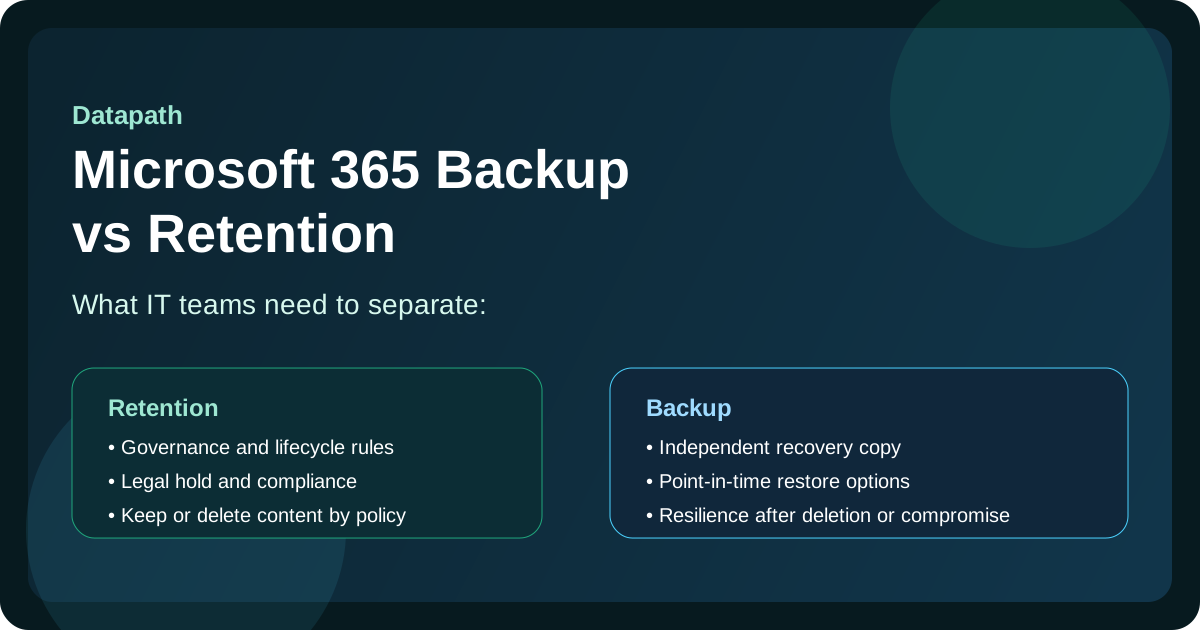
When IT teams compare Microsoft 365 retention policies vs backup, the difference is simple: retention is a governance control, while backup is a recovery control. Microsoft 365 retention policies and labels help organizations decide how long emails, files, chats, and records should be kept or deleted for compliance, legal hold, and lifecycle management. Backup creates a separately governed restore path so the business can recover after accidental deletion, ransomware, tenant compromise, or a major configuration mistake.123
A lot of IT teams blur those two ideas together because Microsoft 365 already includes native retention, version history, recycle bins, and other recovery features. Those tools matter. But they do not answer the same operational question as backup: If something goes badly wrong, can we restore clean, known-good data fast enough for the business to keep running?14
That distinction matters even more for growing companies with regulated workflows, lean IT teams, or shared responsibility across internal staff and outside providers. In those environments, governance and recovery should be designed together, but they should not be mistaken for the same thing.
Need Office 365 backup retention reviewed?
Datapath helps teams separate Microsoft 365 retention, legal hold, backup retention, restore testing, and recovery evidence so Office 365 data protection is easier to explain and prove.
How should Office 365 backup retention and backup policy searches be routed?
Office 365 backup retention searches usually hide a deeper question: does the business need governance, recovery, or both? A retention label may preserve records, but it does not automatically give IT a tested restore path after ransomware, tenant compromise, mass deletion, or an administrative mistake.
| Search signal | What the answer should clarify | Best path |
|---|---|---|
| Microsoft 365 retention policies vs backup | Retention policies preserve, delete, or govern content; backup defines recoverable restore points and recovery ownership | Use this guide for the decision, then review Microsoft 365 backup services if recovery proof matters |
| Microsoft 365 backup vs native retention policies | Native retention can support compliance, but backup should be evaluated by restore scope, restore speed, policy separation, and test evidence | Compare Purview retention, recycle bins, version history, Microsoft 365 Backup, and third-party backup against real restore scenarios |
| Office 365 backup retention | How backup-copy windows differ from Microsoft 365 retention, legal hold, recycle bins, and archive rules | Start with Microsoft 365 backup services if recovery proof matters |
| Office 365 backup and recovery policy | Who owns backup scope, restore approvals, evidence, legal-hold exceptions, and recurring tests | Build a policy that names workloads, RPO/RTO targets, backup retention, restore tests, and reporting owners |
| Microsoft 365 backup retention policies | Who defines backup windows, restore objectives, legal-hold conflicts, and deletion exceptions | Align policy with restore testing, backup-policy behavior, and executive reporting |
| recommend a backup solution for cloud documents that supports legal hold and retention policies | A provider or platform comparison that respects preservation requirements while still proving restore capability | Compare backup, Purview retention, legal hold, audit trails, and recovery evidence together |
What should an Office 365 backup and recovery policy include?
An Office 365 backup and recovery policy should be written around business recovery, not just product settings. It should name the Microsoft 365 workloads covered, the owners who approve restores, the backup retention expectations, and the evidence leadership expects after a test or incident.
At minimum, the policy should cover:
- Exchange Online mailboxes, shared mailboxes, executive mail, and regulated communications
- SharePoint sites, Teams-related files, OneDrive accounts, finance folders, HR folders, and client records
- recovery point objective, recovery time objective, and maximum tolerable data loss by workload
- retention policy, legal hold, archive, and backup-retention boundaries
- restore-test cadence, test scenarios, ticket evidence, screenshots, and owner signoff
- privileged access, backup-administrator separation, MFA, and incident-response escalation
If those answers are unclear, the issue is bigger than Microsoft 365 backup retention. The organization needs a recoverability review that connects Purview retention, Microsoft 365 Backup or third-party backup, legal hold, disaster recovery, and executive reporting.
What is Microsoft 365 retention actually for?
Microsoft 365 retention is primarily built for governance, compliance, and records management. It helps organizations keep content for a required period, preserve data for legal or regulatory reasons, and delete information when policies say it should age out.2
In practice, retention policies are useful for:
- preserving regulated records
- supporting legal hold and eDiscovery
- preventing premature deletion
- enforcing content lifecycle rules
- reducing clutter and unmanaged data sprawl
That is why retention is so important for finance, healthcare, government, and other environments where the organization needs to prove that information is being handled according to policy.
Retention usually works in place, not as a separate backup copy
This is where confusion starts. Retention generally keeps content within the Microsoft 365 environment. A policy may preserve deleted or changed content in protected locations inside the tenant, but that does not mean you now have a complete backup and recovery operating model.23
For many compliance scenarios, in-place preservation is exactly what you want. But for broader recovery scenarios, it creates limits. If the tenant itself is compromised, misconfigured, or administratively damaged, the same environment holding your retained content may be part of the problem.
What is Microsoft 365 backup actually for?
Microsoft 365 backup is built for restore, resilience, and business continuity. A real backup solution gives IT a backup policy, restore points, and recovery workflow that can be used to restore individual items, workloads, or broader states after something destructive happens.14
That usually means backup is the tool IT teams rely on for situations like:
- accidental deletion discovered too late
- malicious deletion by insiders or compromised accounts
- ransomware encryption or destructive tampering
- major administrative mistakes
- tenant-level compromise
- license changes or user departures that affect access to historical data
- the need for broader point-in-time restore options
Retention helps you keep content according to policy. Backup helps you get content back when the business needs recovery.
Why is retention not enough by itself?
Retention is valuable, but it has design limits that matter to operational IT teams.
1. Retention is not the same as point-in-time recovery
If a SharePoint library, mailbox, or OneDrive environment is gradually corrupted, encrypted, or changed over time, retention does not give the same restore experience as a true backup platform. Most businesses want the option to restore to a known historical point. That is a recovery requirement, not just a policy requirement.14
2. Retention lives inside the same tenant
If an attacker gains high-level access, or if an administrator makes a harmful mistake, retention settings can be altered, purged, or weakened. Because retention is part of the production governance environment, it should not be the only recovery layer.25
3. Retention does not equal ransomware resilience
Retention may preserve content, but it does not necessarily preserve a clean version that is easy to restore after a destructive event. If attackers encrypt files or corrupt data inside the tenant, the organization may still need a backup source designed for operational recovery.14
4. Retention is shaped by policy windows and workload behavior
Some native recovery paths are limited by configuration and timing. If data loss is discovered after a retention or recycle-bin window expires, recovery may be far more difficult or impossible through native controls alone.24
That is why we do not think the right question is, “Do we already have retention turned on?” The better question is, “Does our current design meet our real recovery expectations?”
What does backup provide that retention usually does not?
A credible Microsoft 365 backup strategy usually adds four things retention alone cannot fully provide.
Separately governed recovery paths
Backup creates a recovery path that is governed by backup scope, backup retention, restore permissions, and test evidence instead of only by lifecycle-retention rules. Microsoft notes that retention and deletion policies do not flow through to Microsoft 365 Backup copies; backup retention is governed by the backup policy.3
More flexible restore options
Good backup platforms can restore individual emails, folders, files, sites, or broader data sets more predictably than policy-driven native retention features. Microsoft 365 Backup documentation, for example, describes restore workflows for OneDrive, SharePoint, and Exchange using restore points.4
Better support for business continuity
When leadership asks whether the business can recover quickly after a destructive event, they are not asking about records governance. They are asking whether operations can resume. Backup speaks directly to that problem.
Cleaner recovery after security incidents
A separate backup improves recovery posture after ransomware, mass deletion, privilege abuse, or synchronization damage because it gives the team a cleaner restore source outside the immediate blast radius.12
Do most IT teams need both backup and retention?
Usually, yes. We think the strongest Microsoft 365 protection models treat them as complementary layers.
- Retention handles policy, lifecycle, legal, and compliance expectations.
- Backup handles recovery, resilience, and business continuity expectations.
If you only use retention, you may still be weak on restore flexibility and destructive-event recovery. If you only use backup, you may still be weak on content governance, defensible deletion, or records obligations. Mature environments usually need both because governance and recovery are different design problems.123
That layered thinking lines up with how we approach broader Datapath planning. Organizations comparing Microsoft 365 recovery decisions often also need to think about Microsoft 365 backup services, backup and disaster recovery, disaster recovery as a service, managed IT services, and the broader resources and guides hub.
How should IT teams evaluate whether retention is enough?
We recommend asking practical business questions rather than tool questions.
What is our expected recovery outcome?
If the business expects a clean point-in-time restore for mailboxes, OneDrive, SharePoint, or Teams-related files, retention alone may not meet that expectation.
How much damage could a compromised admin account cause?
If one account mistake or tenant compromise could materially disrupt recovery options, independent backup becomes much more important.
How long can the business tolerate data loss or downtime?
The shorter the tolerance, the more the organization should care about predictable restore workflows and tested recovery procedures.
Are we solving compliance and recovery separately?
We think teams get into trouble when they assume one control solves both. Compliance asks whether content was preserved or deleted appropriately. Recovery asks whether the business can restore operations. Those are related, but not identical.
What should a practical Microsoft 365 protection strategy include?
For most growing organizations, a practical strategy should include:
- retention policies aligned to legal, compliance, and lifecycle requirements
- documented ownership for Microsoft 365 data protection decisions
- backup coverage for critical workloads and recovery scenarios
- restore testing on a recurring schedule
- clear expectations for recovery time and recovery point objectives
- admin hardening, MFA, and privileged access review around the tenant
- incident-response planning that includes Microsoft 365 recovery steps
That last point matters. A backup that has never been tested is not much of a recovery strategy. IT teams should be able to prove that restoration works, not just assume it will.
Why Datapath for Microsoft 365 protection planning?
We think Microsoft 365 protection planning should be framed around business risk, not marketing claims. Most organizations do not need a vague promise that their cloud data is “safe.” They need a clearer answer to what happens after deletion, corruption, tenant compromise, or audit pressure.
At Datapath, we help teams translate those concerns into practical controls: better governance, cleaner ownership, more realistic recovery expectations, and technology decisions that hold up when something actually breaks. If your team is trying to decide whether native retention is enough, whether third-party backup is justified, or how Microsoft 365 fits into a broader resilience model, start with Microsoft 365 backup services, review our data storage consulting services, explore our resource guides, or talk with our team.
Frequently Asked Questions
What is the difference between Microsoft 365 retention policies and backup?
Microsoft 365 retention policies govern how long content is kept, preserved, or deleted. Backup governs recoverable copies, restore points, restore permissions, and recovery evidence after deletion, ransomware, tenant compromise, or administrative error.
Is Microsoft 365 backup different from native retention policies?
Yes. Native retention policies support lifecycle governance and preservation. Backup is evaluated by restore scope, restore speed, recovery point selection, backup retention, administrator separation, and whether realistic restores have been tested.
Can Microsoft 365 retention help recover deleted content?
Yes, in some scenarios. Retention can preserve or help recover certain deleted or changed content, depending on workload behavior and policy configuration. But that is not the same as a full backup strategy.
What should an Office 365 backup and recovery policy include?
An Office 365 backup and recovery policy should define protected workloads, backup retention, RPO/RTO targets, restore owners, legal-hold boundaries, privileged access controls, restore-test cadence, evidence requirements, and exception handling.
How long should Office 365 backup retention be?
Office 365 backup retention should be set by business risk, compliance obligations, legal hold, recovery objectives, and backup-platform behavior. Microsoft 365 Backup documentation says backup retention is governed by the backup policy; third-party backup platforms may offer different retention windows and storage models.
Why would a company need backup if Microsoft already stores the data?
Because service availability and recoverability are different things. A separate backup improves protection against accidental deletion, ransomware, tenant compromise, and broader recovery needs that native retention may not fully address.
What is the safest approach for most organizations?
For most growing companies, the safest approach is to use both: retention for governance and compliance, and backup for recovery and business continuity.
Sources
- Microsoft Learn: Overview of Microsoft 365 Backup
- Microsoft Learn: Learn about retention for Microsoft 365 data
- Microsoft Learn: Privacy, security, and compliance in Microsoft 365 Backup
- Microsoft Learn: Restore data in Microsoft 365 Backup
- Microsoft Learn: Shared responsibility in the cloud
Footnotes
-
Microsoft Learn: Overview of Microsoft 365 Backup ↩ ↩2 ↩3 ↩4 ↩5 ↩6 ↩7
-
Microsoft Learn: Learn about retention for Microsoft 365 data ↩ ↩2 ↩3 ↩4 ↩5 ↩6 ↩7
-
Microsoft Learn: Privacy, security, and compliance in Microsoft 365 Backup ↩ ↩2 ↩3 ↩4
-
Microsoft Learn: Restore data in Microsoft 365 Backup ↩ ↩2 ↩3 ↩4 ↩5 ↩6
