
What are the best network segmentation practices for hybrid office environments?
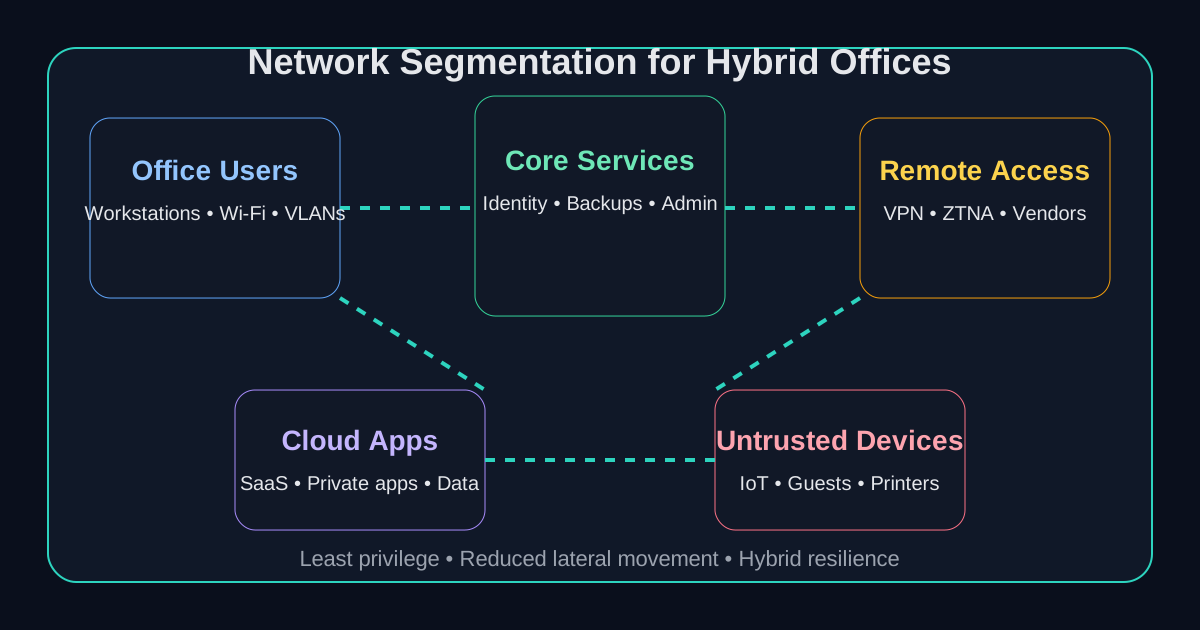
The best network segmentation practices for hybrid office environments are to map business-critical traffic first, separate users and systems by function and risk, apply least-privilege access rules, isolate remote and third-party access paths, and roll changes out in controlled phases. In a hybrid environment, segmentation only works when it covers office networks, cloud workloads, remote users, identity controls, and operational dependencies together rather than treating each one as a separate project.12
For most mid-market organizations, the practical goal is not to create endless VLANs or overengineer policy sets. It is to make lateral movement harder, reduce the blast radius of compromise, and give the business a cleaner way to protect critical systems without slowing everything else down. We usually recommend tying segmentation decisions to business processes, recovery priorities, and compliance expectations so the design stays useful after the initial rollout.
That planning often sits alongside a broader cloud readiness assessment, vulnerability management program, and your overall managed cybersecurity services strategy.
Need a remote-work or IoT/BAS segmentation plan?
Datapath helps map firewall policy, ZTNA or VPN paths, contractor access, cloud workloads, and building-system isolation before changes disrupt operations.
Which hybrid segmentation problem should you solve first?
The right starting point depends on where risk and business disruption are most likely to meet. Searchers often ask about “network segmentation tools for remote work environments” or how to “secure and segment IoT BAS networks from staff networks,” but the practical answer is usually a design decision before it is a product decision.
| Search intent | Start with this control decision | Conversion path |
|---|---|---|
| Remote work segmentation tools | Decide whether users reach applications through ZTNA, VPN, identity-aware firewall policy, or a mix of all three. | Managed firewall services and Zscaler access support |
| IoT or BAS segmentation | Put cameras, sensors, HVAC, badge access, building automation systems, and other low-trust devices in limited zones with explicit allowed traffic. | Managed firewall services |
| Contractor microsegmentation | Limit contractors to named applications, ports, and time-bound support paths instead of broad network ranges. | Zscaler access support and managed cybersecurity services |
| Mixed Windows and Linux systems | Separate admin paths, privileged services, patching tools, and workload groups so one platform does not become a bridge to everything else. | Cybersecurity risk assessment services |
| Cloud segmentation | Align cloud firewall rules, identity groups, private application access, and logging with the same access model used on-premise. | Cloud migration services |
Why does network segmentation matter more in a hybrid office model?
A hybrid office expands the number of trust boundaries your team has to manage. Users connect from headquarters, branch locations, homes, hotels, and customer sites. Applications live across Microsoft 365, private infrastructure, SaaS platforms, and sometimes older on-premise systems that were never designed for modern access patterns. When everything can talk to everything else, one compromised account or device can create a much larger operational problem than it would in a simpler environment.13
Hybrid work creates more paths for lateral movement
The reason segmentation matters is simple: hybrid environments are more connected and more uneven. Some assets are well managed. Others are legacy systems, unmanaged endpoints, vendor-maintained platforms, IoT devices, or remote user networks with very different control maturity. Security teams use segmentation to contain that complexity and limit how far a mistake, malware infection, or stolen credential can spread.34
In our experience, flat environments create two recurring problems. First, small issues turn into large incidents because internal traffic is too permissive. Second, IT teams lose confidence making security changes because they do not know which systems depend on each other. Good segmentation improves both.
The old perimeter model does not fit modern operations
Traditional office security assumed users and systems were mostly inside a trusted network. That assumption breaks down once your operating model depends on remote work, cloud services, outsourced support, mobile devices, and business partners connecting from outside the office. Zero-trust principles and identity-aware access matter here because trust has to be earned per connection, not inherited from network location alone.2
Regulated and uptime-sensitive teams need tighter control
For healthcare, finance, education, local government, and multi-site operations, segmentation is also an accountability control. It helps define where sensitive data lives, which users should reach it, and what guardrails protect critical workflows. That can support compliance and resilience at the same time, especially when paired with clear asset ownership and documented recovery priorities.35
How should a business design segmentation for a hybrid office environment?
The most effective segmentation projects start with visibility and business context, not technology selection. Before changing rules, we recommend identifying which systems matter most, how users connect, which traffic is necessary, and where high-risk access paths already exist.
1. Start with asset inventory and traffic mapping
You cannot segment well if you do not know what is on the network or how systems communicate. Security teams need an inventory that covers servers, endpoints, SaaS dependencies, cloud workloads, remote access tools, network devices, printers, cameras, IoT equipment, and vendor-managed systems. Visibility should include device type, owner, business purpose, location, and common communication paths.3
We usually suggest beginning with three mapping questions:
- Which applications and systems are business-critical?
- Which users, devices, and third parties need access to them?
- Which traffic patterns are expected, unnecessary, or clearly risky?
That sounds basic, but it is where most segmentation projects either become practical or collapse into guesswork.
2. Segment by business function and risk, not just by subnet
Network constructs still matter, but a hybrid environment usually needs more than subnet-level thinking. We recommend grouping systems by what they do and how sensitive they are. For example, user workstations, identity services, line-of-business applications, backup infrastructure, security tooling, VoIP, guest access, OT or IoT devices, and third-party support paths should rarely live in one broad trust zone.24
A useful segmentation model often separates:
| Zone | What belongs there | Why it matters |
|---|---|---|
| User access | employee endpoints, office devices, standard productivity traffic | keeps everyday traffic away from critical infrastructure |
| Critical services | identity, backups, management systems, security tooling | protects the systems that control everything else |
| Business apps | ERP, EHR, finance, operational apps | limits exposure around regulated or revenue-critical workflows |
| Remote access | VPN, ZTNA, admin access, vendor access | reduces risk from external entry points |
| Untrusted/limited devices | guest Wi-Fi, IoT, printers, cameras, contractor devices | prevents weakly managed devices from moving laterally |
3. Use least-privilege and identity-aware policy design
Hybrid office segmentation works better when policy follows identity and approved business need, not just where a user or device happens to connect. We recommend allowing specific flows instead of broad internal trust. That means defining which users, services, and devices should reach which applications, ports, and management paths, then denying what is not required.2
This is where teams often see the value of pairing segmentation with MFA, conditional access, device trust, privileged access controls, and more disciplined administrative workflows. If remote users can reach sensitive systems, the path should be intentional and auditable.
4. Isolate remote, administrative, and third-party access first
If you want early risk reduction, start by segmenting the most exposed access paths. Remote administration, VPN access, third-party support connections, and shared management interfaces are common escalation routes during an incident. We often advise giving these flows their own controlled entry points, stricter authentication requirements, tighter logging, and fewer reachable destinations.35
That approach is usually more valuable than spending weeks debating tiny segmentation refinements in low-risk office traffic.
Which network segmentation best practices matter most in day-to-day operations?
A lot of segmentation advice sounds good in a whitepaper but fails in real environments because it ignores change management and operational reality. The best day-to-day practices are the ones a team can maintain.
Build segmentation in phases
Trying to redesign everything at once is a good way to create outages and lose stakeholder support. Incremental rollout is safer. We recommend testing one segment or policy group at a time, validating required traffic, documenting exceptions, and expanding from there.1
A practical sequence might look like this:
- isolate guest, contractor, and unmanaged device traffic
- separate remote/admin access from normal user traffic
- protect identity, backup, and management systems
- segment business-critical applications and data stores
- tighten east-west rules between workloads and user groups
Prioritize visibility and logging before enforcement gets stricter
Segmentation without visibility turns into break/fix work. Logging matters because teams need to know which connections are being allowed, denied, or attempted unexpectedly. We recommend reviewing policy hits, privileged access events, admin traffic, and failed connection patterns so teams can adjust rules before the business feels pain.3
Treat cloud and office segmentation as one strategy
Hybrid office environments fail when cloud access is governed one way and internal access another. If users authenticate through Entra ID, access SaaS platforms, use remote file shares, and connect to private applications through separate paths, your policies should still reflect one access model. Otherwise the business ends up with gaps between cloud security assumptions and network reality.
Use remote-work segmentation tools to enforce application-specific access
Remote-work network segmentation tools are useful when they turn broad access into application-specific access. A ZTNA platform, VPN policy, managed firewall, secure web gateway, identity provider, and endpoint posture control can all play a role, but none of them should grant a remote user the same reach they would have on a flat internal network.
For a practical remote-work design, define which users need which applications, which devices are allowed, what authentication is required, what traffic is logged, and what happens when a user or device falls out of compliance. NIST’s zero-trust guidance is useful here because it treats location as insufficient proof of trust and emphasizes per-session access decisions for enterprise resources.6
Segment IoT and BAS networks away from staff networks
Many hybrid offices also have devices that are not traditional endpoints: cameras, badge readers, HVAC controls, printers, warehouse scanners, lab systems, medical devices, classroom systems, sensors, and building automation systems (BAS). These devices often need network access but should not have broad reach into corporate, resident, student, or staff networks.
The cleaner pattern is to inventory the devices, place them in limited-function zones, allow only the traffic they need, block management interfaces from ordinary user networks, and log unusual attempts to cross segment boundaries. In schools, clinics, municipalities, finance offices, and senior-care or resident environments, this is often the difference between a useful IoT deployment and an ungoverned lateral-movement path.
Use microsegmentation for contractors and high-value apps
Microsegmentation is most valuable when a user, vendor, or workload should reach one internal application without receiving general network access. For example, a contractor may need a ticketing portal, a file transfer location, or a maintenance interface, but not domain controllers, backup systems, finance apps, EHR systems, or management consoles.
CISA’s zero-trust material frames microsegmentation as a way to limit connections to defined zones or applications.7 In practice, that means pairing contractor identity, device trust, approval workflow, logging, and expiration dates with firewall or ZTNA policy. The outcome should be simple to explain: this person or service can reach this application for this reason, and nothing else by default.
Use microsegmentation where risk justifies it
Not every environment needs highly granular microsegmentation everywhere, but some systems do benefit from it. High-value workloads, regulated applications, and infrastructure that supports many business units are good candidates because tighter east-west controls can materially reduce attack spread.4
Apply zero-trust segmentation to mixed Windows and Linux environments
Mixed Windows and Linux environments need special care because trust relationships, administration tools, patch workflows, service accounts, and monitoring paths may be different by platform. A zero-trust segmentation plan should separate user access, privileged administration, update repositories, log collectors, file services, and high-value application tiers so a compromise in one platform does not automatically become access to the other.
The goal is not to isolate Windows and Linux for its own sake. The goal is to control the paths that matter: admin protocols, remote shells, management agents, authentication services, database access, and backup connectivity. That is where a segmentation plan becomes measurable instead of theoretical.
What mistakes make segmentation projects stall or fail?
Most failed projects are not caused by bad intentions. They are caused by teams trying to segment without enough visibility, without business buy-in, or without a realistic operating model.
Mistake 1: copying a generic template
No two hybrid environments are identical. A design that works for a software company may be wrong for a healthcare group, school district, or multi-site operator with legacy systems and local dependencies. Segmentation should reflect how the business actually works.
Mistake 2: protecting the edge but not the crown jewels
If guest Wi-Fi is isolated but backup systems, administrative tools, and identity platforms remain broadly reachable, the environment still has a major problem. We usually focus on management planes, identity services, critical data paths, and vendor access before polishing lower-risk segments.
Mistake 3: ignoring operational exceptions until go-live
Line-of-business apps, printers, scanners, OT devices, file transfers, and old integrations often break because nobody documented their dependencies. Exception handling should be part of the rollout plan, not an afterthought.
Mistake 4: forgetting the human side
Segmentation changes how teams access systems, troubleshoot issues, and support users. If IT, leadership, and affected departments do not understand why the change matters, the project can be treated like an inconvenience rather than a resilience improvement. Good communication reduces that friction.
Why Datapath for hybrid office network segmentation?
We think segmentation should make the business safer and easier to support, not just more complicated. That means grounding the design in real workflows, remote access realities, cloud dependencies, and the systems your team cannot afford to lose. Our approach is to connect asset visibility, access policy, infrastructure design, and operating discipline so segmentation remains supportable after implementation.
For organizations balancing hybrid work, compliance pressure, and uptime expectations, we help translate security goals into enforceable architecture and practical guardrails. You can also explore our managed IT services, financial services IT support, healthcare IT support, and resources and guides for related planning guidance.
Need a segmentation plan that fits your hybrid environment?
We help teams isolate critical systems, control remote access, and reduce lateral movement without turning daily operations into a constant exception process.
FAQ: Network segmentation best practices for hybrid office environments
What is network segmentation in a hybrid office?
It is the practice of separating users, devices, applications, and infrastructure into controlled zones so access is limited to what is required. In a hybrid office, that includes office networks, remote users, cloud-connected services, and third-party access paths.
What should be segmented first?
We usually recommend starting with guest and unmanaged devices, remote administrative access, identity systems, backup infrastructure, and other high-value services that could enable broad compromise if reached too easily.
Are there network segmentation tools for remote work environments?
Yes. Common tools include ZTNA platforms, VPN policy, managed firewalls, identity providers, endpoint posture checks, secure web gateways, and cloud firewall controls. The tool should enforce least-privilege application access instead of giving remote users broad network reach.
How do you secure and segment IoT or BAS networks from staff networks?
Start with an inventory of cameras, sensors, HVAC controls, badge systems, printers, medical or classroom devices, and other IoT/BAS assets. Place them in limited zones, allow only required traffic, restrict management access, and monitor attempts to reach corporate, resident, student, or staff networks.
How can microsegmentation limit contractors to specific internal apps?
Use identity-based access, ZTNA or firewall policy, approved support windows, named applications, and logging so contractors can reach only the systems needed for their work. Avoid broad VPN ranges, shared admin paths, and standing access that outlives the engagement.
What zero-trust segmentation tips apply to mixed Windows and Linux environments?
Separate privileged administration, authentication services, patching paths, monitoring tools, backup connectivity, and high-value application tiers. Then enforce access per user, device, service, and business need rather than assuming trust because a system sits on the internal network.
Is VLAN-based segmentation enough for hybrid environments?
Usually not by itself. VLANs can still be useful, but hybrid environments often need identity-aware access controls, better visibility, and more granular policy decisions than subnet-based trust alone can provide.
Does segmentation help with ransomware containment?
Yes. Segmentation can limit lateral movement, reduce the number of reachable systems from a compromised device or account, and make it harder for ransomware or an intruder to spread across the environment.
Sources
- Network Segmentation Strategies for Hybrid Environments
- Implementing Branch Network Segmentation Across Hybrid Environments
- Risk-Aware Network Segmentation for the Hybrid Enterprise
- Network Segmentation: A Deep Dive into Isolating and Securing Your Network
- Network Segmentation Security Best Practices
- NIST SP 800-207, Zero Trust Architecture
- CISA Microsegmentation in Zero Trust Part One: Introduction and Planning
Footnotes
-
Network Segmentation Strategies for Hybrid Environments ↩ ↩2 ↩3
-
Implementing Branch Network Segmentation Across Hybrid Environments ↩ ↩2 ↩3 ↩4
-
Risk-Aware Network Segmentation for the Hybrid Enterprise ↩ ↩2 ↩3 ↩4 ↩5 ↩6
-
Network Segmentation: A Deep Dive into Isolating and Securing Your Network ↩ ↩2 ↩3
-
CISA Microsegmentation in Zero Trust Part One: Introduction and Planning ↩