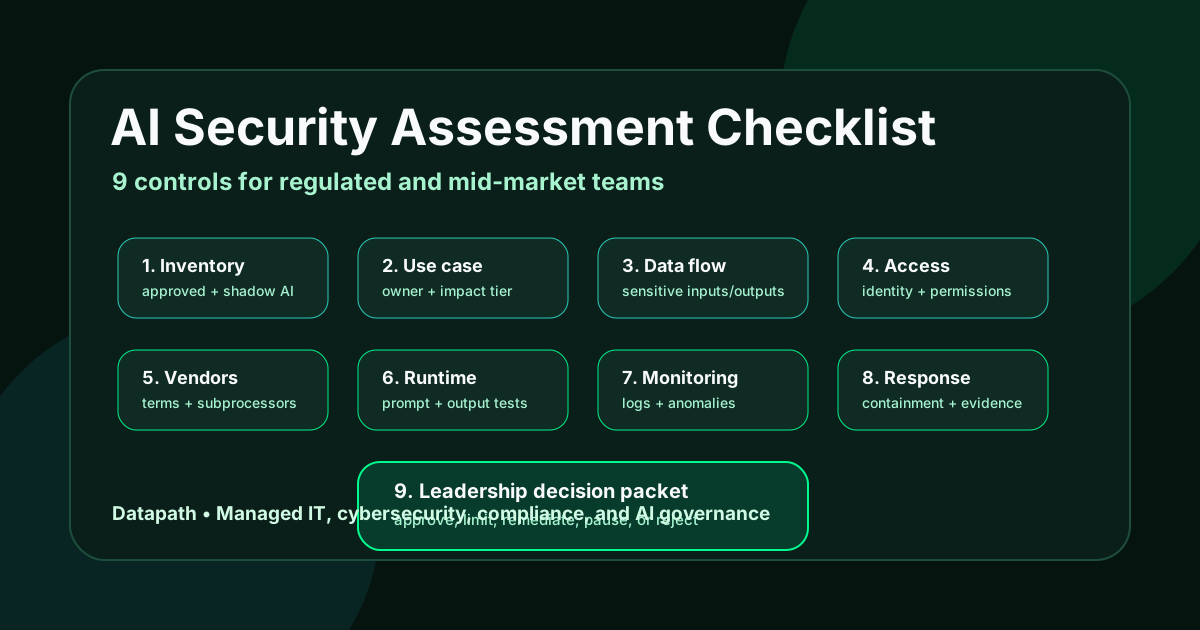

What should an AI security assessment checklist include?
An AI security assessment checklist should include nine controls: AI inventory, business-use approval, sensitive-data mapping, identity and access review, vendor and model-risk review, prompt and output security, logging and monitoring, incident-response planning, and audit-ready evidence. For regulated businesses, the point is to prove who uses AI, what data it touches, what risk it creates, and who owns the controls.
That answer sounds simple until the first real review starts. Most organizations already have AI activity in browsers, Microsoft 365, vendor portals, customer-service tools, finance systems, analytics dashboards, development tools, meeting assistants, and line-of-business platforms. The security issue is not merely whether employees are using ChatGPT. The issue is whether leadership can see the full AI surface area and decide which uses are acceptable.
At Datapath, we see the same pattern in regulated and mid-market environments: AI adoption moves faster than documentation. Teams approve one safe-looking tool, then discover that similar features are already embedded across SaaS platforms, browser extensions, support workflows, file repositories, and vendor products. That is why an AI security assessment has to combine cybersecurity, data governance, vendor risk, and operational accountability.
If your organization is evaluating AI tools, start with Datapath’s AI governance consulting and AI security self-assessment resources, then use the checklist below to turn the conversation into evidence.
| Checklist area | What to verify | Evidence to keep |
|---|---|---|
| Inventory | Approved tools, embedded AI features, shadow AI, owners | AI system register, SaaS inventory, browser-extension review |
| Data | Sensitive inputs, prompts, files, outputs, retention | Data-flow map, DLP findings, approved-use rules |
| Access | Users, admins, service accounts, integrations | Conditional access policies, role list, privilege review |
| Vendors | Contract terms, subprocessors, training-data promises | Security questionnaire, DPA/BAA status where relevant |
| Runtime | Prompt injection, output handling, agency, misuse | Test cases, blocked action logs, exception records |
| Monitoring | Logs, alerts, reporting, cost and usage anomalies | Audit logs, SIEM/MDR notes, review cadence |
| Response | Incident paths for data leakage or harmful outputs | AI incident playbook, communications plan, decision log |
1. Which AI tools are actually being used?
A useful assessment starts with inventory because unrecorded AI use cannot be governed. The first list should include sanctioned tools, unsanctioned tools, AI features inside existing platforms, browser extensions, plugins, APIs, embedded copilots, and vendors using AI behind the scenes.
Build a practical AI system register
The register does not need to be fancy. It needs to answer these questions:
- What is the tool or AI-enabled feature?
- Which department uses it?
- Who is the business owner?
- What data can users submit?
- Does the tool create, summarize, classify, predict, recommend, or act?
- Does it connect to email, files, CRM, EHR, ERP, finance, ticketing, or identity systems?
- Is it approved, blocked, under review, or tolerated with limits?
NIST describes the AI Risk Management Framework as a way to improve an organization’s ability to incorporate trustworthiness considerations into AI systems and services.1 In plain terms, you cannot manage AI trustworthiness if you cannot name the systems.
Include embedded AI, not only standalone apps
Many misses happen because the review focuses only on obvious AI products. Microsoft 365, CRM suites, help desk platforms, security tools, analytics platforms, HR systems, code tools, call-recording platforms, and document systems may all add AI features without creating a new procurement event.
That is why our secure AI adoption roadmap starts with use cases and data paths, not a generic policy announcement. The inventory should follow the work.
Flag shadow AI without turning the review into theater
Shadow AI is not automatically malicious. It usually appears because employees are trying to move faster. But if users are pasting contracts, student data, PHI, financial records, code, incident notes, or client files into unapproved tools, the organization has a real data-governance problem.
Use the assessment to separate three categories: approved tools, blocked tools, and tools that need a defined review path. Then link the decision to a written shadow AI policy rather than relying on Slack warnings and memory.
2. What business decision does the AI support?
An AI security assessment should not treat all AI use the same way. A grammar assistant, a meeting summarizer, a claims triage model, a phishing-response agent, and an AI tool that changes firewall rules do not carry the same risk.
Classify the use case by impact
Use a simple impact tier:
- Low impact: drafting, brainstorming, formatting, or internal summarization with no sensitive data.
- Moderate impact: workflows that touch internal records, customer communications, staff productivity, or vendor operations.
- High impact: workflows that touch regulated data, security decisions, financial transactions, medical operations, student data, public services, privileged access, or automated actions.
The tier determines the review depth. Low-impact use may need acceptable-use rules and training. High-impact use needs data mapping, vendor review, access control, logging, testing, and incident response.
Name the human owner
Every AI workflow should have a business owner and a technical owner. The business owner decides whether the output is useful and acceptable. The technical owner verifies access, data, logging, configuration, and risk controls.
This is where vCISO services can help when leadership needs security ownership but the internal team is already running daily operations.
Document prohibited uses
A strong assessment writes down what the AI system may not do. Examples include:
- make final hiring, medical, legal, financial, or disciplinary decisions without human review
- process regulated or confidential data unless the tool is approved for that class of data
- connect to production systems without least-privilege controls
- generate customer-facing claims without review
- execute changes without a rollback path and logged approval
Prohibited-use rules are not bureaucracy. They are the control boundary that prevents a useful assistant from turning into an ungoverned operator.
3. What data can enter or leave the AI workflow?
Data exposure is the most immediate AI security risk for most businesses. The review should identify what users can paste, upload, sync, query, retrieve, generate, export, and retain.
Map sensitive data before pilot expansion
Create a data-flow map for each approved AI workflow. Include:
- source systems, such as email, SharePoint, Google Drive, EHR, ERP, CRM, ticketing, SIS, payroll, finance, or code repositories
- input types, such as prompts, attachments, transcripts, screenshots, PDFs, exports, logs, or database records
- output destinations, such as chat history, documents, tickets, customer messages, records, reports, or automations
- retention and deletion settings
- administrator access and vendor support access
CISA’s Cyber Essentials tells organizations to learn what information resides on their network, maintain inventories of critical or sensitive information, and establish backup and protection practices for key systems.2 AI does not remove that obligation. It makes the data path harder to see.
Check training, retention, and tenant isolation terms
Vendor claims matter, but the contract and configuration matter more. Confirm whether prompts, files, outputs, telemetry, feedback, or embeddings are used for training, retained for abuse monitoring, stored by region, accessed by subcontractors, or excluded from customer deletion controls.
For financial-services workflows, the FTC Safeguards Rule frames customer-information protection as a required safeguards program for covered institutions.3 For healthcare workflows, HHS publishes cybersecurity guidance for HIPAA covered entities and business associates.4 The AI assessment should map tool behavior to the organization’s real regulatory context without pretending one generic AI policy covers every environment.
Separate data security from answer quality
A model can produce useful answers while still creating unacceptable data exposure. The review should test whether the tool leaks sensitive inputs, stores more than expected, retrieves unauthorized files, over-shares search results, or gives users answers based on records they should not be able to access.
That is why the checklist belongs next to cybersecurity risk assessment services and cybersecurity compliance services, not only next to innovation planning.
4. Are identity, access, and permissions strong enough?
AI amplifies identity problems. If file permissions, groups, shared mailboxes, service accounts, or privileged roles are messy, AI can surface that mess faster and at larger scale.
Review user access and admin roles
Check whether AI access is assigned by role, group, department, license, or manual exception. Then review:
- privileged administrators
- external guests
- shared accounts
- service principals and application permissions
- terminated or transferred users
- unmanaged devices
- personal accounts used for business AI work
If the tool connects to Microsoft 365, SaaS repositories, or internal applications, stale permissions can become data leakage. Our guide to Microsoft 365 service account audits is a useful companion when AI workflows depend on app permissions and delegated access.
Enforce conditional access where possible
Microsoft says Conditional Access combines signals such as user, device, and location to automate decisions and enforce access policies for resources.5 For AI-enabled platforms, that means the assessment should verify MFA, device requirements, location or risk controls, administrative restrictions, and protected actions where available.
Do not let AI access become an exception path around identity governance.
Test permission boundaries with real examples
Ask users from different roles to query the same tool against the same repository. A finance user, HR user, clinic manager, school administrator, and executive should not all receive the same sensitive records simply because an AI search feature can index them.
The evidence should include screenshots or logs showing that role boundaries actually work.
5. Have vendors been reviewed for AI-specific risk?
Vendor review has to include more than SOC 2 status and a privacy policy. AI vendors introduce model, data, prompt, output, and automation risks that ordinary SaaS questionnaires may not catch.
Ask AI-specific vendor questions
Require answers to these questions before production use:
| Vendor question | Why it matters |
|---|---|
| Are customer prompts, files, outputs, or feedback used to train models? | Controls data reuse and confidentiality risk |
| Where is data stored and processed? | Supports regulatory and contractual review |
| What subprocessors can access customer data? | Identifies third-party exposure |
| What admin logs are available? | Determines whether incidents can be investigated |
| Can customers disable features or restrict data sources? | Supports least privilege and phased rollout |
| How are prompt injection and abuse handled? | Tests whether the vendor understands AI threat models |
| What happens when the tool gives harmful or wrong output? | Clarifies escalation and responsibility |
This review fits naturally with vendor risk management services when AI is entering business-critical workflows.
Check contractual notification and evidence duties
CISA’s guidance for MSPs and small to mid-sized businesses recommends reviewing service-provider contracts for security controls, monitoring and logging expectations, monitoring of provider activity, and notification of confirmed or suspected security events.6 Apply the same discipline to AI vendors and AI-enabled service providers.
Decide whether the vendor or the business owns the risk
A vendor can secure its platform and still leave the customer’s use case risky. If your staff uploads regulated files, connects broad repositories, or uses outputs without review, the risk sits with your operating model too.
The assessment should document shared responsibility instead of treating vendor approval as a blanket green light.
6. Has the AI workflow been tested for prompt, output, and agency risk?
AI-specific testing should cover how the system behaves when users, documents, websites, emails, tickets, or attackers attempt to manipulate it.
Test prompt injection and sensitive information disclosure
OWASP’s 2025 Top 10 for LLMs and Gen AI Apps lists prompt injection, sensitive information disclosure, supply chain, data and model poisoning, improper output handling, excessive agency, system prompt leakage, vector and embedding weaknesses, misinformation, and unbounded consumption as core risks.7
For a business assessment, translate that list into test cases:
- Can a user make the tool ignore policy instructions?
- Can a malicious document influence the answer?
- Can prompts extract hidden instructions, credentials, or confidential records?
- Can outputs include regulated or confidential data the user should not see?
- Can the tool make changes or trigger actions beyond its approved role?
Validate output handling before automation
If AI output feeds another system, the receiving workflow needs validation. Do not let generated text create tickets, send emails, update records, execute scripts, or change security settings without guardrails.
Improper output handling is especially dangerous when teams connect AI to automations. Treat model output as untrusted until it passes validation, approval, and logging.
Limit excessive agency
AI agents and copilots become riskier when they can retrieve data, call tools, modify systems, or complete transactions. The assessment should verify:
- allowed tools and blocked tools
- approval steps for sensitive actions
- transaction limits
- rollback paths
- error handling
- audit logs
- privileged access controls
If your organization is considering agentic workflows, start smaller than the vendor demo. Give the system narrow authority, monitor it, then expand only when evidence supports expansion.
7. Can the organization monitor AI use and detect abuse?
A control that cannot be monitored is mostly a policy statement. The checklist should verify that IT and security teams can see usage, access changes, configuration changes, suspicious prompts, data exports, failed controls, cost spikes, and incident signals.
Define the minimum log set
The minimum log set usually includes:
- sign-ins and MFA events
- administrator changes
- app consent and integration changes
- user and group assignments
- file or repository access tied to AI workflows
- prompt, response, or interaction metadata where available and appropriate
- data-loss prevention events
- vendor security alerts
- incident tickets and escalation notes
Our security alert prioritization guide covers the broader discipline: alerts need ownership, context, severity, and validation paths or they become noise.
Watch cost and usage anomalies
Unbounded consumption is an AI-specific operational risk. Sudden token usage, API calls, report generation, embedding jobs, or automation loops can create both security and financial problems. The review should define thresholds and owners for unusual activity.
Include AI in security reviews and QBRs
AI risk should appear in leadership reporting. Datapath’s managed cybersecurity services and managed IT services models connect monitoring, tickets, roadmaps, and executive review so new technology risk does not disappear between departments.
8. Is there an AI incident response path?
AI incidents will not always look like ransomware or account compromise. A realistic AI incident path should include data leakage, unauthorized access through AI search, harmful output, vendor breach, prompt injection, model abuse, runaway automation, and customer-impacting misinformation.
Define reportable scenarios
List the scenarios employees and managers must report, such as:
- regulated data pasted into an unapproved AI tool
- AI returning records the user should not access
- prompt injection affecting a business workflow
- automated actions outside approved limits
- suspected vendor AI platform breach
- inaccurate AI output used in a customer, patient, student, or financial workflow
- unusual usage or cost spikes
Assign containment actions
Containment may include disabling a connector, removing users, revoking tokens, changing app permissions, preserving logs, exporting evidence, pausing a workflow, notifying a vendor, or moving a process back to manual review.
CISA’s Cyber Essentials tells leaders to develop incident response and disaster recovery plans, outline roles and responsibilities, test often, and learn who to call for help.2 AI should be explicitly included in that playbook.
Preserve evidence
The incident file should include dates, users, prompts or interaction IDs where available, data sources, outputs, access decisions, vendor tickets, containment steps, business impact, notification analysis, remediation, and final approval to resume use.
For regulated organizations, evidence is the difference between “we think we handled it” and “we can show what happened.”
9. What evidence should leadership review before approving broader AI use?
The final output of an AI security assessment should be a decision packet, not a vague risk memo. Leadership needs enough detail to approve, limit, pause, or reject a workflow.
Build the assessment decision packet
A practical packet includes:
- AI system register entry.
- Business purpose and owner.
- Approved and prohibited uses.
- Data-flow map.
- Access-control review.
- Vendor-risk summary.
- Prompt, output, and agency test results.
- Logging and monitoring plan.
- Incident-response path.
- Open risks and compensating controls.
- Decision: approve, approve with limits, pilot only, remediate first, or reject.
This is the accountability layer that keeps AI from becoming a collection of disconnected experiments.
Connect AI security to existing governance
AI does not need a parallel universe of controls. It should connect to existing cybersecurity risk assessments, vendor reviews, acceptable-use policies, incident response, change management, data governance, identity management, and executive reporting.
Datapath’s AI policy enforcement tools guide and AI governance business documents guide both reinforce the same point: the strongest AI programs turn intent into reviewable operating records.
Decide what gets reviewed again
AI workflows change quickly. Set review triggers before approval:
- new data source
- new department
- new vendor feature
- new automation or tool action
- new regulated-data use
- material security incident
- major access model change
- contract or subprocessor change
- poor output-quality findings
A one-time assessment is not enough if the tool keeps expanding.
Need an AI security assessment your leadership can act on?
Datapath helps regulated and mid-market teams inventory AI use, map data exposure, review vendors, validate controls, and turn findings into a practical governance roadmap.
Why Datapath for an AI security assessment checklist?
Datapath works with regulated and mid-market organizations that need AI adoption to be useful without becoming invisible risk. We connect AI governance, managed IT, cybersecurity monitoring, vendor review, identity controls, backup readiness, and executive reporting into one operating model.
If your team is trying to approve AI safely, start with the Datapath AI security self-assessment, review our AI governance consulting, and talk with Datapath about turning scattered AI use into a documented control plan. You can also return to the Datapath homepage for broader managed IT and cybersecurity context.
Frequently Asked Questions
What is an AI security assessment checklist?
An AI security assessment checklist is a structured review of AI tools, users, data flows, vendors, permissions, testing, logs, incident response, and evidence. It helps a business decide whether an AI workflow is safe to approve, needs limits, or should be paused until controls are fixed.
What should be reviewed before approving a new AI tool?
Review the business purpose, data types, user groups, administrator roles, vendor terms, training and retention settings, integrations, logging, prompt and output risks, incident response, and evidence ownership. The review should end with a documented approval decision, not an informal yes.
How is AI security different from ordinary cybersecurity?
AI security uses ordinary cybersecurity controls like identity, logging, vendor review, and incident response, but adds AI-specific risks such as prompt injection, sensitive information disclosure, excessive agency, output handling, model or data poisoning, system prompt leakage, and unbounded consumption.
Does every AI tool need a full security assessment?
No. Low-impact tools may only need acceptable-use rules, training, and data restrictions. AI workflows that touch regulated data, privileged access, customer records, financial workflows, healthcare operations, student data, public-sector systems, or automated actions need a deeper security assessment.
Who should own AI security assessments?
AI security assessments should have both a business owner and a technical owner. Security, IT, compliance, legal, procurement, and department leaders may all contribute, but one accountable owner should maintain the decision record, open risks, and review schedule.
What evidence should regulated businesses keep for AI governance?
Keep the AI system register, approved-use decision, data-flow map, vendor review, access-control review, testing notes, logging plan, incident-response path, training evidence, exceptions, remediation owners, and leadership approval record. That evidence helps prove the organization is managing AI risk deliberately.
Sources
- NIST AI Risk Management Framework
- CISA Cyber Essentials
- FTC Safeguards Rule: What Your Business Needs to Know
- HHS Cyber Security Guidance Material
- Microsoft: Plan Your Microsoft Entra Conditional Access Deployment
- CISA Insights: Mitigations and Hardening Guidance for MSPs and Small- and Mid-Sized Businesses
- OWASP Top 10 for LLMs and Gen AI Apps
