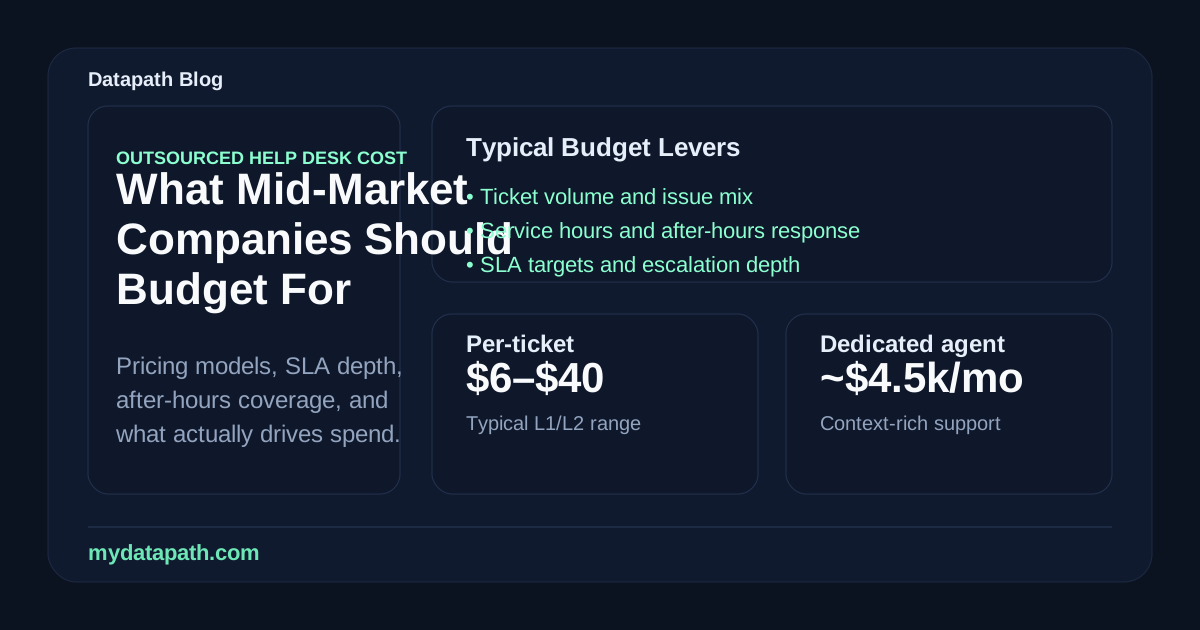

How much does outsourced help desk cost in 2026?
Outsourced help desk cost in 2026 usually depends on user count, monthly ticket volume, support hours, SLA expectations, escalation depth, and whether the provider is handling shared Tier 1 support, dedicated service desk capacity, co-managed overflow, or a fully managed IT support model. Help desk outsourcing pricing is not one universal average. As a planning benchmark, public pricing references still show per-ticket help desk outsourcing often varying by support level and volume, while the larger monthly budget is usually determined by scope, coverage, onboarding, tooling, reporting, and escalation ownership.1
For a mid-market company, the better question is usually not “What is the cheapest outsourced help desk rate?” It is “What monthly support model will keep users productive without forcing internal IT or leadership to clean up every escalation?” That is where pricing gets clearer. A low per-ticket rate can be useful for narrow Tier 1 work. It can also become expensive if tickets reopen, after-hours issues fall through, or internal engineers spend their week translating between users, vendors, and the outsourced queue.
Use this as a practical starting point:
| Buyer situation | Pricing model to compare first | What usually changes the monthly cost |
|---|---|---|
| 50-100 users with routine requests | Shared help desk, per-ticket, or light per-user support | Ticket volume, business-hours coverage, documentation quality, and how often issues need escalation |
| 100-250 users with steady demand | Per-user, hybrid, or dedicated capacity | User count, VIP support, onboarding/offboarding, Microsoft 365 administration, vendor coordination, and SLA targets |
| Internal IT needs overflow | Co-managed help desk support | Ticket routing rules, shared tooling, escalation authority, reporting, and whether internal IT keeps Tier 2 or Tier 3 work |
| 24-hour or multi-site operations | Hybrid, dedicated, or after-hours retainer | Nights, weekends, severity definitions, on-call paths, and business-impact response expectations |
| Regulated or security-sensitive teams | Managed IT or security-forward support model | Identity, endpoint security, backup validation, evidence, incident escalation, and change control |
Searchers often use cost, pricing, and service desk terms interchangeably. Before comparing outsourced help desk pricing, translate the search into a proposal request:
| Search phrase | Ask the provider to price | Why it matters |
|---|---|---|
| Outsourced help desk cost | Monthly recurring fee plus onboarding, documentation cleanup, tools, escalation, and any excluded project work | Shows the real budget beyond the headline support rate |
| Outsourced help desk pricing | Per-user, per-ticket, dedicated-capacity, block-hour, or hybrid model assumptions | Lets finance compare proposals on the same unit math |
| Help desk outsourcing costs | Business-hours coverage, after-hours response, user count, ticket volume, and ticket categories | Separates normal support from expensive edge cases |
| Cost of outsourced IT help desk | Which systems, vendors, devices, Microsoft 365 tasks, and security handoffs are included | Prevents a cheap front desk from pushing work back onto internal IT |
| Outsourced service desk pricing | Live channels, SLA targets, escalation depth, reporting, and whether Tier 2/Tier 3 is included | Clarifies whether the provider is selling intake or real service ownership |
| 24-hour IT help desk support cost per user | Live 24-hour desk, after-hours urgent response, or 24-hour ticket intake | Avoids paying for full 24-hour coverage when only urgent escalation is needed |
At Datapath, we recommend building a help desk outsourcing budget around the operating model first, then comparing proposal math. If your team already has outsourced help desk pricing or outsourced service desk pricing quotes, talk with Datapath and we can help pressure-test scope, SLA assumptions, and hidden cost drivers before you sign.
For teams that need more than a narrow support queue, Datapath’s IT outsourcing services page maps how outsourced help desk, Microsoft 365 support, endpoint work, vendor coordination, backups, cybersecurity escalation, and executive reporting can fit into one accountable operating model.
What pricing models do outsourced help desk providers use?
Most outsourced help desk providers use one of five pricing models: per-ticket, per-user, dedicated capacity, block hours, or hybrid pricing. The right model depends on how predictable your demand is, how much ownership the provider needs, and whether the help desk is a narrow queue or part of a larger managed IT relationship.
How does per-ticket help desk pricing work?
Per-ticket pricing charges for each incident or service request the provider handles. ScienceSoft’s current help desk pricing reference describes ticket price as varying by support level and monthly ticket volume, with support coverage, SLA terms, issue complexity, languages, and team composition all affecting cost.1
Per-ticket pricing can work well when:
- ticket volume is measurable and relatively predictable
- most issues are routine Tier 1 requests
- documentation is clean enough for an outside queue to work efficiently
- internal IT can absorb escalations without creating bottlenecks
- leadership wants usage-based pricing instead of a fixed monthly commitment
The risk is incentive design. If the provider is paid by ticket count, buyers need to verify first-contact resolution, reopen rates, recurring issue analysis, and escalation quality. A cheap ticket is not cheap if the same problem comes back three times.
How does per-user help desk outsourcing pricing work?
Per-user pricing charges a recurring monthly amount for each supported employee. This model is common when the provider handles a defined support catalog: help desk intake, endpoint support, Microsoft 365 requests, onboarding/offboarding, password and MFA issues, printer and peripheral support, vendor coordination, and basic reporting.
Per-user pricing is useful because it gives leadership a predictable monthly budget. It also aligns better with growth. If headcount increases, the support budget changes in a way finance can forecast.
The catch is scope. A per-user rate may or may not include after-hours issues, onsite dispatch, complex application support, network troubleshooting, VIP escalation, security-tool triage, or project work. Buyers should compare what is included before comparing the monthly number.
When does dedicated help desk capacity make sense?
Dedicated capacity means the provider reserves a specific agent, team, or service block for your organization. This usually costs more than a shared queue, but it can be the better value when your users need context, continuity, and faster escalation.
Dedicated capacity often fits organizations with:
- steady ticket volume every month
- specialized workflows or line-of-business applications
- higher executive or VIP support expectations
- multiple sites or departments with different needs
- internal IT teams that need an outside partner to act like an extension of the department
The buyer tradeoff is simple: you are paying for reserved attention. That can be a good decision when downtime and user friction are expensive. It can be wasteful when ticket demand is low or poorly understood.
When should block hours be avoided?
Block hours can work for project support, transition cleanup, or occasional escalation engineering. They are usually weaker for daily help desk operations because every request consumes the bank. That can create hesitation: users stop submitting tickets, internal IT delays escalation, and small issues pile up.
Use block hours for clearly bounded work such as documentation cleanup, Microsoft 365 tenant remediation, ticketing workflow setup, or network discovery. Be cautious when a provider wants routine support, after-hours response, and recurring service reviews to live in the same hour bank.
Why are hybrid pricing models common for mid-market teams?
Hybrid pricing combines a baseline monthly scope with usage-based or separately scoped additions. For mid-market companies, this is often the most realistic structure because support demand is rarely perfectly flat.
A hybrid help desk agreement might include:
- a fixed monthly support base for a defined user count
- included business-hours Tier 1 support
- a documented escalation path for Tier 2 or vendor issues
- after-hours response for priority incidents
- separate project pricing for migrations, cleanup, or hardware rollouts
- monthly reporting and service review
Hybrid pricing is attractive because it can keep the operating model stable while still acknowledging spikes from onboarding, seasonal work, audits, device refreshes, or office moves.
How much should a company budget per month?
A company should budget monthly help desk outsourcing by modeling users, tickets, coverage hours, escalation depth, and transition effort. Do not start with a provider’s cheapest unit price. Start with how much support the business actually consumes and what happens when support fails.
This table gives leadership a more useful planning frame than a generic rate card:
| Monthly budget input | What to collect before requesting quotes | Why it affects price |
|---|---|---|
| Supported users | Active employees, contractors, shared accounts, VIP users, and seasonal staff | User count drives recurring support, identity work, onboarding, and endpoint questions |
| Ticket volume | Last 3-6 months of incidents and requests by category | Volume determines whether per-ticket, per-user, or dedicated capacity is more economical |
| Support hours | Business hours, extended hours, weekends, holidays, and emergency coverage | 24-hour coverage requires staffing, handoff, and severity rules that cost more than 8x5 support |
| Issue mix | Password resets, Microsoft 365, endpoint, network, application, vendor, and security tickets | Simple Tier 1 support costs less than multi-step troubleshooting and vendor coordination |
| SLA expectations | First response, triage, escalation, restoration, communication, and reporting | Faster targets and tighter accountability require more capacity and process maturity |
| Tooling | Ticketing, RMM, remote access, documentation, endpoint security, backup dashboards | Tool ownership and integration change both onboarding and monthly operating cost |
| Transition work | Documentation cleanup, access review, runbooks, workflow mapping, and knowledge transfer | A messy environment can make the first 30-90 days more expensive than the steady-state fee |
For in-house comparison, remember that salary is only one part of the cost. The U.S. Bureau of Labor Statistics reported a May 2024 median annual wage of $60,340 for computer user support specialists and $73,340 for computer network support specialists.2 BLS Employer Costs for Employee Compensation data also shows benefits as a meaningful portion of total employer cost, with private-industry benefits accounting for 30.1 percent of total compensation in March 2026.3 That does not automatically mean outsourcing is cheaper. It means an honest comparison has to include wages, benefits, recruiting, management, tools, after-hours coverage, turnover, escalation depth, and the cost of delayed projects.
Is outsourced help desk cheaper than in-house support?
Outsourced help desk support can be cheaper than hiring internally when the business needs repeatable Tier 1 coverage, after-hours escalation, ticket overflow, or broader tooling without adding full-time headcount. It may not be cheaper when the company needs constant onsite support, deep application knowledge, or dedicated support staff who spend all day inside the business.
The comparison usually breaks down like this:
| Cost category | In-house support | Outsourced help desk |
|---|---|---|
| Labor | Salaries, benefits, payroll taxes, recruiting, management, training | Monthly service fee tied to scope, users, tickets, or capacity |
| Coverage | Limited by staff count and schedules | Can add business-hours, after-hours, or 24-hour support more flexibly |
| Tooling | Ticketing, remote monitoring, documentation, endpoint tools, reporting | May be included, partially included, or required by provider |
| Escalation | Depends on the depth of internal team | Depends on provider’s Tier 2/Tier 3 access and vendor coordination |
| Context | Strong institutional knowledge | Must be built through onboarding, documentation, and repeated exposure |
| Accountability | Direct control, but internal bottlenecks are common | Strong when SLA, reporting, and ownership are written clearly |
The cheapest structure is not always the best structure. If internal IT is losing strategic time to routine support, a co-managed help desk may create more value than a pure cost comparison shows. If the company has no internal IT leader, fully managed IT may be cleaner than trying to outsource only the front desk while nobody owns the environment.
Compare this guide with our managed IT services pricing guide and co-managed IT support guide if your team is deciding whether to outsource only help desk support or move toward a broader MSP relationship.
What changes 24-hour help desk outsourcing pricing?
24-hour help desk outsourcing costs more because the provider has to staff, schedule, document, triage, and escalate outside normal business hours. BLS notes that computer support services may need to be available 24 hours a day, and some support specialists work nights or weekends.2 That reality shows up in pricing.
Before buying 24-hour coverage, separate three very different needs:
| Coverage need | What it really means | Buying caution |
|---|---|---|
| 24-hour ticket intake | Users can submit requests any time | Intake is not the same as real-time troubleshooting |
| After-hours urgent response | Priority incidents get triaged outside business hours | Define severity levels, approval authority, and escalation contacts |
| True 24-hour service desk | Users can reach live support around the clock | Useful for shift work, healthcare, field operations, or global teams, but expensive if rarely used |
Many mid-market teams do not need a live 24-hour desk for every request. They need a strong after-hours path for business-impacting issues and a normal business-hours process for everything else. That distinction can materially lower the monthly cost without leaving the business exposed.
Ask each provider:
- Which request types receive live after-hours support?
- What qualifies as priority one, priority two, and standard support?
- Who can approve after-hours work or emergency changes?
- What communication does leadership receive during an incident?
- Which systems are monitored automatically after hours?
- What work is included versus billable?
- What happens if the issue requires onsite response?
If the answer is just “we offer 24/7 support,” the proposal is not detailed enough.
What hidden costs should buyers watch for?
The most common hidden costs in help desk outsourcing come from vague scope, weak onboarding, tool assumptions, and undefined escalation rules. The proposal may look clean because the expensive work is not named yet.
Watch for these items:
| Hidden cost | Why it appears | What to ask before signing |
|---|---|---|
| Onboarding and documentation | The provider needs access, runbooks, ticket categories, escalation contacts, and environment context | What is included in the first 30, 60, and 90 days? |
| Ticketing and tooling | Some providers use their stack; others require yours or add license fees | Which tools are included, and who owns the data? |
| After-hours support | Emergency response often has different pricing than daytime support | What is included after hours, and what is billable? |
| Application support | Line-of-business apps are harder than generic desktop issues | Which applications are in scope, advisory only, or excluded? |
| Vendor coordination | ISP, copier, EHR, ERP, phone, or software vendors consume support time | Who opens, tracks, and owns vendor tickets? |
| Onsite dispatch | Remote support does not solve every issue | When is onsite included, and what triggers a separate charge? |
| Security-related tickets | MFA, endpoint alerts, risky sign-ins, and suspicious activity require care | Is security triage included or handed off to a separate team? |
| Project work | Migrations, device refreshes, tenant cleanup, and network changes are not daily support | Which project categories are excluded from recurring support? |
Security scope deserves special attention. NIST CSF 2.0 frames cybersecurity as a governance and risk-management discipline, not a one-time technical checklist.4 NIST SP 800-61 Rev. 3 also ties incident response preparation, detection, response, and recovery to broader cyber risk management.5 If your outsourced help desk touches identity, endpoints, remote access, backup alerts, or suspicious user reports, the agreement should say how those issues are triaged and escalated.
How should buyers compare outsourced help desk proposals?
Buyers should compare outsourced help desk proposals using a scope worksheet, not a lowest-price spreadsheet. A rate only matters after the provider explains what it owns, what it excludes, and how it will be measured.
Use this worksheet:
| Proposal area | Good answer | Weak answer |
|---|---|---|
| Included support | Clear list of request types, systems, users, channels, and hours | ”All help desk support” with few details |
| Pricing model | Explains per-user, per-ticket, capacity, or hybrid assumptions | Hides unit assumptions or usage thresholds |
| Escalation | Names Tier 2/Tier 3 path, vendor handoff, and internal-owner responsibilities | Says complex issues are “escalated” without ownership |
| SLA | Defines response, triage, communication, and restoration expectations by priority | Lists only a generic response-time target |
| Reporting | Provides monthly trends, recurring issue analysis, SLA performance, and recommendations | Sends ticket counts with little interpretation |
| Security | Explains MFA, suspicious activity, endpoint alerts, admin access, and incident handoff | Treats security as separate from support |
| Transition | Documents first 30-90 days, access, cleanup, runbooks, and service launch | Assumes the desk starts clean on day one |
| Contract flexibility | Explains what changes when users, ticket volume, or coverage needs change | Locks vague scope into a long term |
The best proposal should make the operating model easier to understand. If leadership cannot explain how a user gets help, how an urgent issue escalates, or what the provider reports every month, the pricing is not ready for approval.
When should outsourced help desk be co-managed instead of fully outsourced?
Use a co-managed help desk when your internal IT team should keep business ownership but needs more capacity, after-hours coverage, tooling, or escalation support. Use a fully outsourced or managed IT model when the business wants one external provider to own more of the environment.
| Situation | Better-fit model | Why |
|---|---|---|
| Internal IT is overloaded by routine tickets | Co-managed help desk | Internal IT keeps strategy and escalations while the MSP absorbs repeatable support |
| No dedicated IT leader exists | Fully managed IT | Someone needs to own standards, vendors, security, and planning |
| Tickets spike seasonally | Hybrid or overflow support | Capacity can expand without permanent headcount |
| Users need 24-hour urgent coverage | Co-managed or managed IT with after-hours escalation | Coverage can be built around severity and risk |
| Security alerts and identity issues hit the help desk | Managed IT or security-forward co-managed support | Support and security need shared workflow |
| The business has many sites or regulated data | Managed IT or deeper co-managed model | Support quality depends on documentation, reporting, and escalation ownership |
If internal IT is valuable but stretched, start with co-managed IT support. If leadership wants one accountable provider for help desk, infrastructure, cybersecurity, backup, vendor coordination, and planning, review managed IT services and the broader Datapath solutions.
Why Datapath treats help desk outsourcing pricing as a service-design decision
Datapath supports mid-market and regulated organizations that need more than a low-cost queue. We help teams define what should be handled by the help desk, what should escalate, how after-hours coverage should work, which security issues need special handling, and how leadership should measure whether the support model is improving operations.
That matters because help desk pricing is easy to compare badly. A low rate can hide weak documentation, no vendor ownership, vague SLA language, thin escalation depth, or a transition plan that pushes cleanup back on your team. A better model connects support to the rest of IT operations: endpoint management, Microsoft 365 administration, network reliability, backup readiness, cybersecurity response, and recurring service review.
For buyers, the goal is not to buy the most expensive plan. It is to buy the support model that fits the business:
- enough capacity to protect user productivity
- enough documentation to avoid repeated discovery
- enough escalation depth to keep internal IT from becoming the cleanup crew
- enough reporting for leadership to see trends and risks
- enough security awareness to route suspicious activity correctly
- enough flexibility to handle growth, projects, and after-hours incidents
Need help comparing outsourced help desk pricing? Datapath can review your support scope, SLA assumptions, escalation paths, and monthly budget model so you can compare providers on real operating fit instead of headline rates. Book a pricing review.
Frequently asked questions about help desk outsourcing pricing
What is the average help desk outsourcing cost per month?
Monthly cost depends on users, tickets, support hours, escalation depth, and scope. A business-hours Tier 1 queue is usually priced very differently from a 24-hour service desk, co-managed support model, or fully managed IT agreement. Buyers should ask providers to show the monthly assumptions behind the quote.
Is help desk outsourcing priced per user or per ticket?
Both models are common. Per-ticket pricing works best when request volume is measurable and support scope is narrow. Per-user pricing is usually easier to forecast when the provider handles a defined monthly support catalog for employees.
What is help desk outsourcing cost per user per month?
Per-user help desk pricing varies widely because the scope varies widely. A narrow support desk may include only basic intake and Tier 1 troubleshooting, while a broader MSP agreement may include endpoint management, Microsoft 365 administration, vendor coordination, reporting, and escalation.
What is help desk outsourcing cost per ticket?
Public help desk outsourcing references show per-ticket pricing varies by support level and ticket volume.1 A per-ticket model should always be compared against first-contact resolution, reopen rates, escalation quality, and what happens when an issue is not resolved at Tier 1.
Is outsourced help desk cheaper than hiring support staff?
It can be cheaper when the company needs flexible coverage, repeatable Tier 1 support, ticket overflow, or after-hours response without hiring multiple employees. It may not be cheaper when the business needs constant onsite support or deep application-specific knowledge every day.
How much does 24-hour IT help desk support cost?
24-hour support usually costs more than business-hours support because the provider must staff nights, weekends, handoffs, and escalation paths. Buyers should separate 24-hour ticket intake, after-hours urgent response, and true live 24-hour service desk coverage before comparing prices.
What hidden fees appear in outsourced help desk contracts?
Common hidden costs include onboarding, documentation cleanup, ticketing tools, onsite dispatch, after-hours work, complex application support, vendor coordination, security-related triage, and project labor. Ask each provider to label included, excluded, and billable work.
Should internal IT keep Tier 2 and Tier 3 support?
Often, yes. In a co-managed model, the outsourced desk can handle Tier 1 and overflow while internal IT keeps business-specific systems, higher-risk changes, and strategic ownership. The agreement should define escalation paths so work does not bounce between teams.
What should an outsourced help desk SLA include?
An outsourced help desk SLA should define support hours, covered systems, priority levels, first response, triage, escalation, restoration expectations, after-hours rules, reporting, communication, exclusions, and how recurring issues are reviewed.
How does Datapath help compare outsourced help desk pricing?
Datapath helps organizations compare help desk proposals by mapping scope, users, ticket demand, support hours, SLA assumptions, escalation ownership, security handoff, onboarding work, and reporting expectations into an apples-to-apples buying model.